


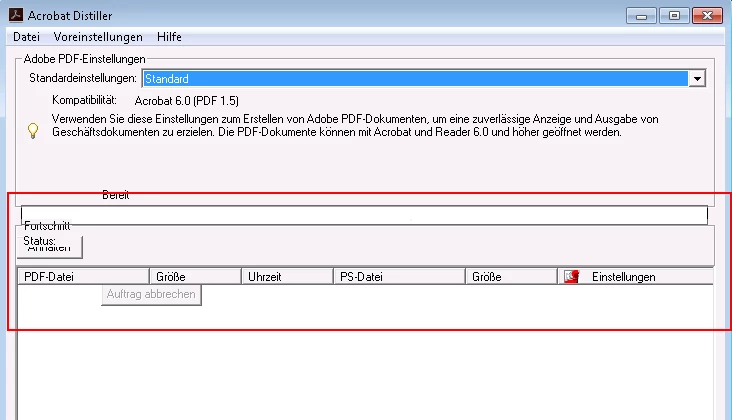
Buttons inside the GUI of Acrobat Distiller are misplaced when deploying with German license. How to fix that?
My customer has bought two licenses for Acrobat Standard DC 2017 (classic track). One German license key and one "International English" license key.
So I have created two different .MST-files using Acrobat Customization Wizard one for each license key.
Both files are identical except for the license key used for installation.
Deployments are working fine, but when I start the Acrobat Distiller from the German installation it looks like this:
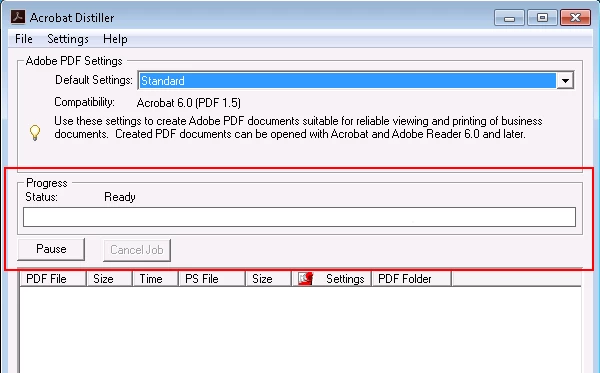
In comparison this is the GUI of the english Distiller as it should be:
No reboot or reinstallation could change that. I already tried to switch the Windows GUI, but no change.
The target OS-platform is Windows 7 Enterprise (64-bit) patchlevel November 2018.

I have not found any comparable issue when googling, yet.
Has anybody got the same or similar issue and any hint how to fix that?

 AdChoices