Participating Frequently
November 9, 2015
Answered

can acrobat std DC be deployed via the userconfig.xml as opposed to globally?

  • November 9, 2015
  • 15 replies
  • 3260 views

Hi,

I am sequencing Acrobat Standard DC and have followed the app-v deployment guide App-V Deployment: Acrobat DC — Enterprise Administration Guide but our VDI environment is user-based and not machine-based so deploying globally will not work.

Is there any way I can deploy using the userconfig.xml and ensure the license is activated?

This topic is closed to new replies. Start a new post to keep the conversation going.
Correct answer binnysach

OK I now have a licensed app on VDI - this was achieved by using the AddPackage script command in the DeploymentConfig.XML and dropping the UserConfig XML when importing the sequence.

The only issue now remaining is when I try to create PDF's from DOCX/XLSX (works fine for TXT files) - I get the following error. Is this to do with (the lack of) interaction with Office 2013 or is it due to having a virtualised Adobe PDF Printer inside the sequence?

COM Integration Mode is set to

<COM Mode="Integrated">

        <IntegratedCOMAttributes OutOfProcessEnabled="true" InProcessEnabled="false" />

</COM>

Object Interaction is set to

<Objects Enabled="false">
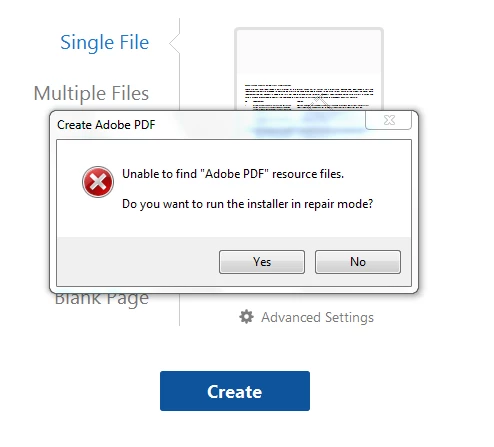

One need install the supplementary App-V MSI Downloads on the user’s machine which contain Acrobat’s integration points for applications such as:

  • MS Office Integration - Context Menu and In-App Acrobat Ribbons.
  • Mails Integration - MS Outlook and Lotus Notes will start showing Acrobat Features.
  • Adobe PDF Printer - Allows the user to print any file to Adobe PDF.
  • Web Capture - Allows the user to be able to convert a webpage to Adobe PDF inside the Browser.
  • Registers necessary fonts on the client which will be used by the virtual application.

The same can be downloaded from http://www.stage.adobe.com/devnet-docs/acrobatetk/tools/AdminGuide/appvacrobatDC.html#msi-downloads

Please note this MSI has been designed specifically with machine based deployment. This has not been validated and tried with the user specific deployment.


15 replies

EnterpriseHelp
Inspiring
November 9, 2015

I don't think so. Installs are per machine and not per user.

On the other hand, my App-V knowledge is limited so I'll forward this question to an expert for the Final Answer.

Ben

Adobe Employee
November 10, 2015

As Ben suggested user specific deployment is not supported. For your scenario and activation need, there is a workaround which should make it work -

To publish globally we write scripts in the Machine scripts section in the deploymentconfig.xml. To resolve your case create the same script extension points (as done under MachineScripts) by adding the script calls inside UserScripts section in the Userconfig.xml (for script details please refer to Post Sequencing section: http://www.stage.adobe.com/devnet-docs/acrobatetk/tools/AdminGuide/appvacrobatDC.html#post-sequencing-steps)

However, this is untested and supported scenario and hence there could be certain functionalities that might not work.

Participating Frequently
November 10, 2015

Hi binnysach,

I don't think that will work as any scripts run from here will be run in the user context (so not elevated as all our users have basic rights) but I will try it. However to get to this point I need to create the prov.xml from the APTEE and incorporate this into the sequence.

I have run the elevated command (see below - I have blocked out the serial number but I used it with and without hyphens with the same result) to generate the XML file but I am getting Return Code 32 which relates to "Invalid SLConfig path". Can you tell me what this means please and how to get around it? I am running this on a machine connected to the internet.

adobe_prtk.exe --tool=VolumeSerialize --generate --serial=<myserialnumber> --regsuppress=ss
