
Participant
February 27, 2023
Answered

Can't access InDesign for Demo period

  • February 27, 2023
  • 4 replies
  • 962 views

Hi,


On February 15, 2023, I signed up for access to Adobe InDesign.  I provided a corporate card and was logged into my corporate account.  Adobe's system let me sign up, sent me an email about the free 7 day trial, and I tried to access.  But, because my company doesn't subscribe, I cannot download the software from my Adobe account.  I also cannot reach out to help, because the system tells me to reach out to my local IT support (being a managed corporate Adobe account).  I reached out to my company's IT and they have no idea how to get access or to cancel the subscription.


So, now I am in a catch-22 created by Adobe.  Their system allowed me to sign up and pay for a subscription, but will not let me access.  I need to cancel and reverse any charges as I have not had access and apparently cannot.  I was going to use the demo period to assess whether it suited my purposes or not, but never got that opportunity.


Thank you for help!
This topic has been closed for replies.
Correct answer iCharles

Hi @Eddie28614604703f ,


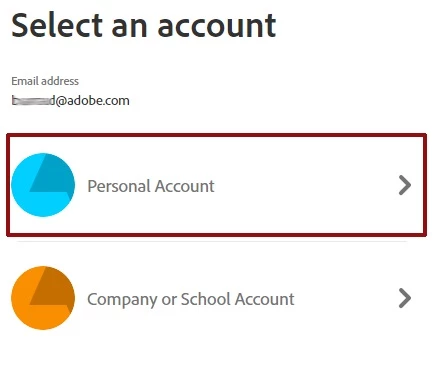
I have reviewed the email address which you used to post here and can say that your Indesign for Individual Plan is currently active. To access the Adobe plans that you have purchased, you would have to switch profiles.


If you want to switch profiles, sign out and sign back in. After entering your credentials, the Profile chooser will display.


Select the profile of your choice.


Hope this helps.

Charles Samuel


4 replies

iCharlesCorrect answer
Legend
February 28, 2023

Hi @Eddie28614604703f ,


I have reviewed the email address which you used to post here and can say that your Indesign for Individual Plan is currently active. To access the Adobe plans that you have purchased, you would have to switch profiles.


If you want to switch profiles, sign out and sign back in. After entering your credentials, the Profile chooser will display.


Select the profile of your choice.


Hope this helps.

Charles Samuel


Abambo
Community Expert
Community Expert
February 27, 2023

If you have subscribed to a Teams account, then you are the contract owner and you can access the admin console:

https://adminconsole.adobe.com


With that admin console, you can create a package that your IT will be able to install on your system.


ABAMBO | Hard- and Software Engineer | Photographer
kglad
Community Expert
Community Expert
February 27, 2023

you apparently signed up for a teams or enterprise subscription via your organization.  the plan administrator at your organization should contact adobe support if they don't know how to help.  ie, they should open the support tab on their admin console > start chat or start case or request expert session.


https://helpx.adobe.com/enterprise/using/support-and-expert-services.html


<moved from download&install>

Community Expert
February 27, 2023

Hi @Eddie28614604703f,

Try reaching Adobe support via Twitter @Adobecare

-Manan

-Manan