Bryan_Lazatin
Participant
January 15, 2019
Answered

Can't get the AE 16.0.1 on my work PC but can have it on my personal PC

  • January 15, 2019
  • 6 replies
  • 906 views

Can't get the AE 16.0.1 on my work PC but can have it on my personal PC

    This topic has been closed for replies.
    Correct answer alisterblack

    Hello,

    My After Effects directly came from Creative Cloud desktop app which I downloaded from the web. I have checked with the local IT as well and it seems I have all the admin rights necessary. They don’t have control over the Creative Cloud which doesn’t seem to have the latest version of After Effects. Kindly let me know of any other solutions you may have in mind.

    -Bryan


    Hi,

    Thanks. What is the exact OS that you are running?

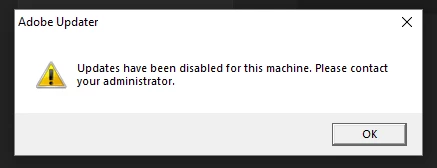
    If you open After Effects and choose Help>Updates what happens?

    For example do you get a message like this:

    6 replies

    alisterblack
    Inspiring
    January 16, 2019

    Hi,

    Can I confirm that you are talking about After Effects?

    What happens when you try to install on your work PC? Is there an error you can share?

    Bryan_Lazatin
    Participant
    January 16, 2019

    Hello,

    Just to clarify. I have after effects on both my work and personal PCs. However, I only have version 16.0 on my work PC while I have 16.0.1 on my personal one. For some reason, the creative cloud on my PC doesn’t populate 16.0.1

    Kindly let me know if you can assist further. Thank you in advance!

    Bryan Lazatin

    UI Motion Designer - NHL

    Electronic Arts | blazatin@ea.com<mailto:blazatin@ea.com> | 778 990 7891

    alisterblack
    Inspiring
    January 16, 2019

    Hi,

    If the version on your work machine comes from a package installed by your IT team it is possible that they have blocked updates. This can be done when creating a package. They may be deploying updates using an alternative method such as Remote Update Manager.

    I would check with your IT team, or if you have admin rights on your machine refer to the following document.

    Disable auto-updates in Adobe Creative Cloud and Adobe Creative Suite 6 apps