


philippe96875501
Participating Frequently
August 23, 2017
Answered

Can't install PS (2017) via MSI

  • August 23, 2017
  • 3 replies
  • 1618 views

Hello,

my company bought several Adobe CC products (2017). We've got the Creative CloudPackager and I have build a PhotoShop package.

Now the problem is, that I can't install the software via MSI because everytime the setup asks for proxy credentials -.^

And it doesn't matter if the credentials are wrong, right or blanc, the installation process fails after clicking "continue".

So the question is: why such prompt and how to supress it?

The Exe-setup is no option.
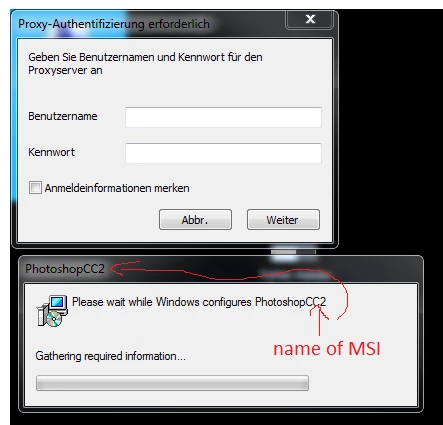
Thanks for your help.

This topic has been closed for replies.
Correct answer alisterblack

If you run the MSI as admin with an appropriate command such as msiexec /i "PhotoshopCC2.msi" /qn what happens?

Do you have an exception to your proxy set for setup.exe but not when installing via MSI?

You could use a tool such as Fiddler to trace what is being blocked. In the fiddler trace you should look for a 407 authentication request.

3 replies

alisterblack
Inspiring
September 8, 2017

Hi,

Please check that your company proxy environment is supported Proxy support in Adobe Creative Cloud Products

philippe96875501
Participating Frequently
September 12, 2017

Sorry, but I don't need FAQ sites and to check the proxy environment is not the right answer.

The proxy works well, the configuration for localhost etc is configured correctly.

As I told you before the setup fails at every option, even if the credentials are right.

btw, if I deploy the setup with the 'setup.exe --silent' it all works fine öÔ

But this can't be the solution, I want to deploy with MSI. 

Because the Exe only starts the/a MSI-setup it seems so that the Exe hands over some parameter to the MSI and therefor the setup doesn't ask for credentials.

The real problem is that the MSI asks for credentials if executed manually.

alisterblack
alisterblackCorrect answer
Inspiring
September 12, 2017

If you run the MSI as admin with an appropriate command such as msiexec /i "PhotoshopCC2.msi" /qn what happens?

Do you have an exception to your proxy set for setup.exe but not when installing via MSI?

You could use a tool such as Fiddler to trace what is being blocked. In the fiddler trace you should look for a 407 authentication request.

Bani Verma
Legend
September 8, 2017
Akash Sharma
Legend
September 7, 2017