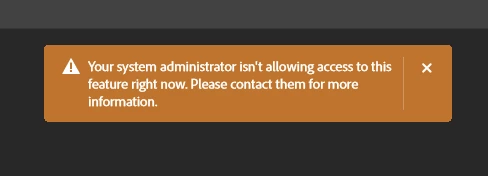
Based on your query, it appears that you are unable to use Google Gemini 2.5 Flash Image (Nano Banana) and are receiving the following prompt while trying to access it in Photoshop:
“Your system administrator is not allowing access to this feature right now. Please contact them for more information.”
Please confirm if this is the issue you need assistance with.
As checked, your Adobe ID is associated with an active Enterprise (Education K-12) contract. Kindly note that Google Gemini 2.5 Flash Image (Nano Banana) is a premium generative feature, while Creative Cloud for Education (K-12) plans provide access only to standard generative features. This is why you are currently unable to use it.
You can refer to the following documentation for more details:
Hello! The forums are full of the same questions on this topic. It still isn't working for us, even though we have Creative Cloud Pro Teams. Why is that?
To help us assist you more effectively, could you please let us know the specific issue you are encountering while using Creative Cloud Generative AI features in Adobe apps?
Additionally, please confirm whether the issue occurs only with Adobe partner models—such as Generative Fill with Google Gemini 3 (with Nano Banana Pro), Google Gemini 2.5 Flash Image (Nano Banana), FLUX.1 Kontext [pro], FLUX.2 pro; Generative Upscale with Topaz Labs; AI Denoise with Topaz Labs; or AI Sharpen with Topaz Labs—or if you are experiencing the issue across all Creative Cloud Generative AI features.
It would also be helpful if you could share a screenshot of the issue you’re seeing.
We look forward to your response so we can assist you further.



 AdChoices