

jonathand72798802
Participant
February 22, 2017
Answered

CC app freeze

  • February 22, 2017
  • 1 reply
  • 230 views

Hi there,

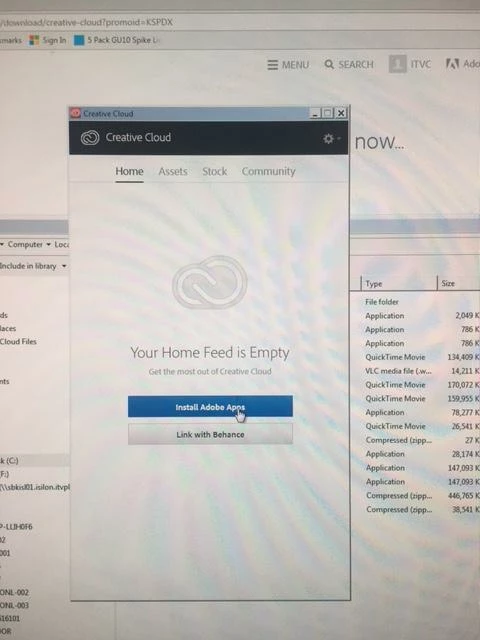
CC application won't let me install apps, it gets hung on the screen grab below

have internet access to adobe servers etc.

have uninstalled & reinstalled the CC app etc

thanks
    This topic has been closed for replies.
    Correct answer alisterblack

    You have no Apps panel. The Apps panel can be disabled by a system admin when packaging.

    If you have admin rights on your machine you can reverse this. Change false below to true.

    <?xml version="1.0" encoding="UTF-8"?>

    <config>

        <panel>

            <name>AppsPanel</name>

            <visible>false</visible>

        </panel>

    </config>

    Disable apps panel - configuration file location:

    • Windows: C:\Program Files (x86)\Common Files\Adobe\OOBE\Configs\ServiceConfig.xml
    • Mac OS X: <system drive>//Library/Application Support/Adobe/OOBE/Configs/ServiceConfig.xml

    1 reply

    alisterblack
    alisterblackCorrect answer
    Inspiring
    February 22, 2017

    You have no Apps panel. The Apps panel can be disabled by a system admin when packaging.

    If you have admin rights on your machine you can reverse this. Change false below to true.

    <?xml version="1.0" encoding="UTF-8"?>

    <config>

        <panel>

            <name>AppsPanel</name>

            <visible>false</visible>

        </panel>

    </config>

    Disable apps panel - configuration file location:

    • Windows: C:\Program Files (x86)\Common Files\Adobe\OOBE\Configs\ServiceConfig.xml
    • Mac OS X: <system drive>//Library/Application Support/Adobe/OOBE/Configs/ServiceConfig.xml
