


Inspiring
May 22, 2026
Question

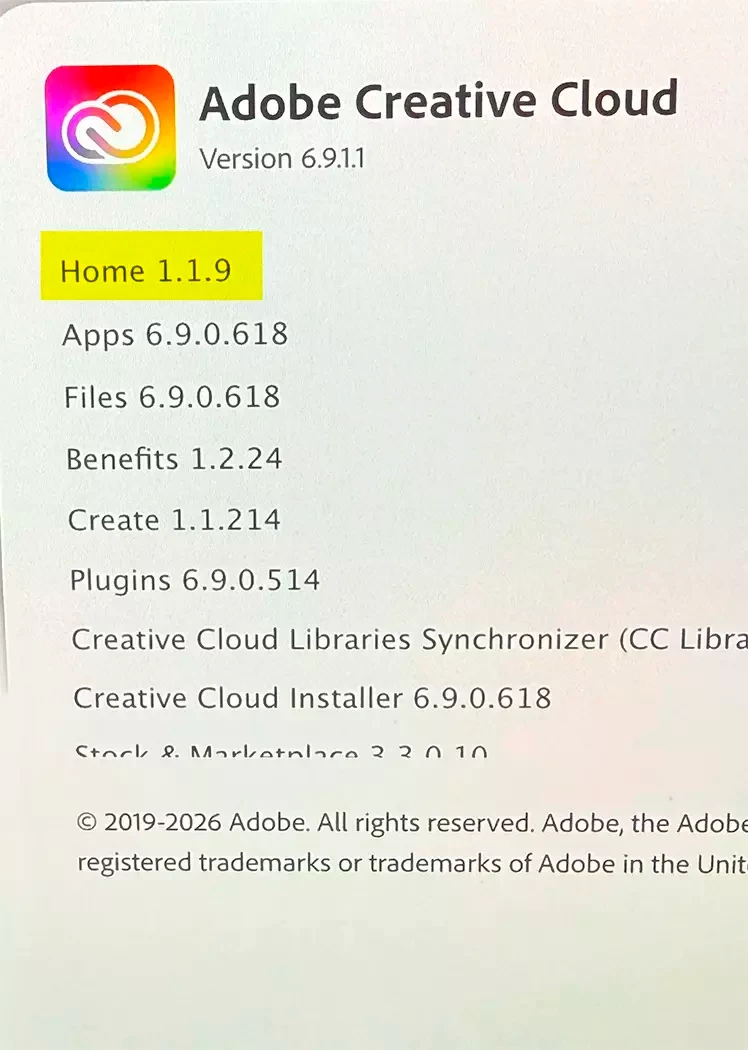
CC Desktop App - Home Module Stuck at v1.1.9

  • May 22, 2026
  • 1 reply
  • 28 views

On one of our Macs, the Creative Cloud Desktop App “Home” module is stuck at version 1.1.9 instead of 6.9.0.619 like the rest of our Macs. 

I’ve tried repairing and then uninstalling/reinstalling, but nothing seems to help.

Does anyone know how to fix?
 

    1 reply

    Community Manager
    May 25, 2026

    Hi ​@leighr,


    Thank you for reaching out, and we completely understand how disruptive it is to have one Mac out of step with the rest of your fleet, especially when repair and reinstall have already been attempted without success.


    Since the standard reinstall hasn't resolved it, there are two steps we'd recommend working through in order on the affected Mac:

    Step 1 – Clear the OPM.db file: A corrupted OPM.db file can cause the Creative Cloud desktop app to read installed module versions incorrectly. To clear it:

    1. Quit the Creative Cloud desktop app completely (Creative Cloud menu > Quit Creative Cloud).

    2. Open Spotlight (Command + Spacebar) and navigate to: ~/Library/Application Support/Adobe/OOBE/

    3. You can find the file named opm.db, right-click it, and select Move to Bin.

    4. Relaunch the Creative Cloud desktop app, sign back in, and check whether the Home module has updated.

    Step 2 – Run the Creative Cloud Cleaner Tool If Step 1 doesn't resolve it, the Creative Cloud Cleaner Tool is designed for exactly this scenario — cases where a standard uninstall and reinstall haven't cleared the underlying issue. It removes corrupted installation files that a regular reinstall won't touch. Please follow the preparation steps carefully before running it, as the process can affect locally stored files: https://adobe.ly/4dNoHKZ


    Before we go further, please let us know what macOS version is running on the affected Mac. That will help us rule out OS-level factors if the above steps don't fully resolve the issue.


    Please don't hesitate to follow up here with the results, and we'll be happy to continue from there.
     

    Thanks,

    ^BS

    leighrAuthor
    Inspiring
    May 26, 2026

    Thanks so much for the suggestions, I’ll give them a try!

    Currently, we’re running macOS 26.5 on all of our machines.

    Community Manager
    May 26, 2026

    Thank you for sharing the OS version. Please let us know once you’ve tried the suggested steps and whether the issue has been resolved, or if you still need any further assistance.


    We’ll be happy to help further if needed


    Thanks, 

    ^BS