


Participant
September 10, 2026
Question

CC Package Deployment Error - ARM (Snapdragon X Devices)

  • September 10, 2026
  • 5 replies
  • 46 views

I am trying to deploy Creative Cloud via Intune for Microsoft Surface 7 laptops (ARM based Snapdragon X processors). Before I package the software for Intune and script it, I’ve run it on a local device to test that it installs ok. When I run the setup.exe just by double clicking it I get the following error.
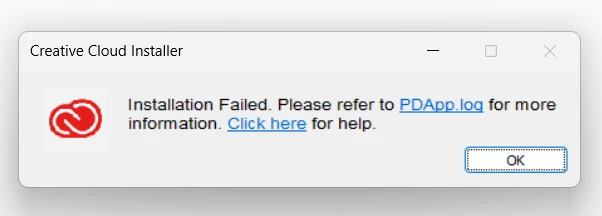
There is nothing being logged in the PDApp.log within any of my temp folders.

Has anyone else successfully deployed the self-service package of CC to ARM based devices via Intune? What am I missing? 

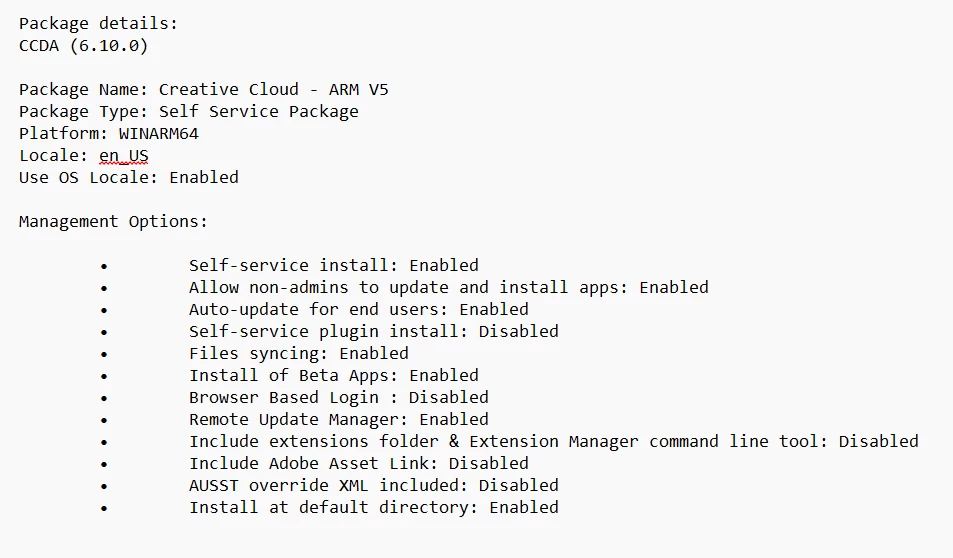
I’ve followed Adobe’s documentation and it’s no good. My package details are below:
 

5 replies

Participant
September 10, 2026

Hi Tariq,

Thanks for the detailed response, that’s super helpful.

I wasn’t super clear in my initial post but I had already checked the temp folder within my user profile (nothing there). I can confirm that I’m running Windows 11 25H2 Build 26200.9445 and my Qualcomm Adreno X1-85 GPU driver version is 31.0.133.1 both of which should meet minimum requirements. 

When checking the setup.exe build it’s coming up blank (doesn’t tell me either way in both task manager and through PowerShell). I’ve attempted to run the Log Collector Tool (installed the ARM version) but it throws an error:

Even though it errors out there is still a ZXP file generated which I’ll share with Adobe support if/when I open a case.

At this point I’m about ready to go scorched earth and reinstall Windows on my machine and then try the whole install again. 

Thanks,

Isaac

Community Manager
September 10, 2026


Thanks for the details, and for confirming the OS build and GPU driver, Issac!


The Log Collector Tool crashing with error 0xc000007b is actually useful information. That error means Windows couldn't load the binary due to an architecture or dependency mismatch, and the most common cause on ARM64 systems is a missing or mismatched Visual C++ Redistributable. Before anything as drastic as reinstalling Windows, it's worth checking:

  • Install or repair the Visual C++ 2015 to 2022 Redistributable (ARM64) from Microsoft's official redistributable page, then retry the Log Collector Tool
  • If the Log Collector Tool runs cleanly afterward, retry the Creative Cloud Desktop install directly; the same missing dependency could plausibly be what's causing the install to fail before PDApp.log is ever written

If that doesn't resolve it, you already have a usable diagnostic package: the ZXP file that was generated despite the tool's error. Open a support case and attach that ZXP along with the OS build, GPU driver version, and the steps you've already run. This is enough to support investigating without you needing to reproduce everything again.

Let us know if the redistributable check changes anything before you go further.


~Tariq

Participant
September 16, 2026

Hi Tariq,

Thanks for that info, you’ve been super helpful.

I’ve run a repair install on the Visual C++ Redistributable which enabled the Log Collector Tool to run without error.

The setup.exe is still giving me issues even after this, so I’m going to open a support case with Adobe to try and get to the bottom of it.

Kind regards,

Isaac

Community Manager
September 10, 2026

Hello ​@isaac_4637,


Thank you for the package details, that's a solid starting point.

Before diagnosing further, it's worth double-checking the exact log location, since the path differs from a generic temp folder search.

  • For a local test install (double clicking setup.exe as you did), PDApp.log is at %Temp%\CreativeCloud\ACC under your own user profile, not the general Temp root
  • This folder is hidden by default, enable Show hidden files in File Explorer options if you don't see it
  • If you later deploy through Intune as system context, the equivalent log sits under the system profile's temp folder rather than the interactive user's

Could you confirm you checked that specific subfolder, and if a PDApp.log file exists there, share its contents, specifically any line containing ERROR or FATAL? That's what we'd need to match against Adobe's bootstrapper and product installation error tables and give you an actual cause rather than a guess.

If that exact folder is confirmed empty, the install is likely failing before the bootstrapper starts logging, which most commonly traces back to an unmet system requirement rather than a packaging error. Worth ruling out in parallel:

  • Confirm the Surface devices are on Windows 11 version 24H2, build 26100.2033 or later, the documented minimum for native Windows on ARM support in current Creative Cloud apps, per Support for ARM-based Windows devices
  • Confirm the Qualcomm Adreno GPU driver is at 31.0.121.1 or later
  • Confirm what actually downloaded is the native ARM64 build rather than an x86/x64 payload running under emulation

If the above doesn't turn up anything, this may need a support case rather than a self-serve fix. Run the Log Collector Tool on the test device and share those logs when you open the case, that gives support everything from the failed attempt in one place.

Let us know what you find in that exact log path, along with the OS build number, and we can help narrow it down further.


Thanks,
Tariq