


CCP 1.9.3 & Setup.exe not silent for Acrobat Pro DC
Hello,
I have a question regarding silently deploying Adobe Acrobat Pro DC (Continuous) via Creative Cloud Packager.
Previously, we have been deploying via MSI & exception deployer method. This has worked fine for our environment so far.
I've recently updated to the CCP 1.9.3, whereby the deployment method has now been superseded by simply using the "setup.exe" instead of pre-post, exception deployment, etc.
I've also followed the updated documentation regarding silently deploying using setup.exe as seen in the below links.
https://helpx.adobe.com/creative-cloud/packager/ccp-readme.html
Deploy Adobe Acrobat XI or DC
While this method technically works on machines with no applications running, our problem is the following:
Acrobat DC has several dependencies or non-ignorables that halt installation if they are open. These include Microsoft Office apps such as Word, Excel, Powerpoint, etc. Previously when using MSI method, the /qn /quiet, etc switches would still allow for an installation of Acrobat DC, the user would simply have to re-open said Microsoft Office application to reload any plugins or .dlls. When using the new setup.exe method, this is not the case.
Even when the "--silent" switch is used, there is a prompt to close these applications which halts the installation process (screenshot).
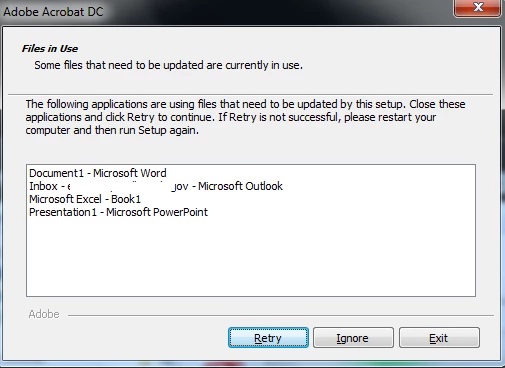
Since this requires interaction and because we use a remote tool/system account for deployment, it causes our deployments to hang at this step and ultimately fail. While it's possible to force close these applications as a pre-install step in our batch script, this would not be the preferred method especially since MSI installations seemed to allow ignoring these open applications previously.
Is there a way to still install Acrobat while having these items open? I still see AcroPro.msi in the setup folders so I would assume that it should still be possible to opt for MSI install method instead. However, my understanding is that using setup.exe is now the preferred method.
Thanks for any help!
 AdChoices