
Inspiring
August 21, 2014
Question

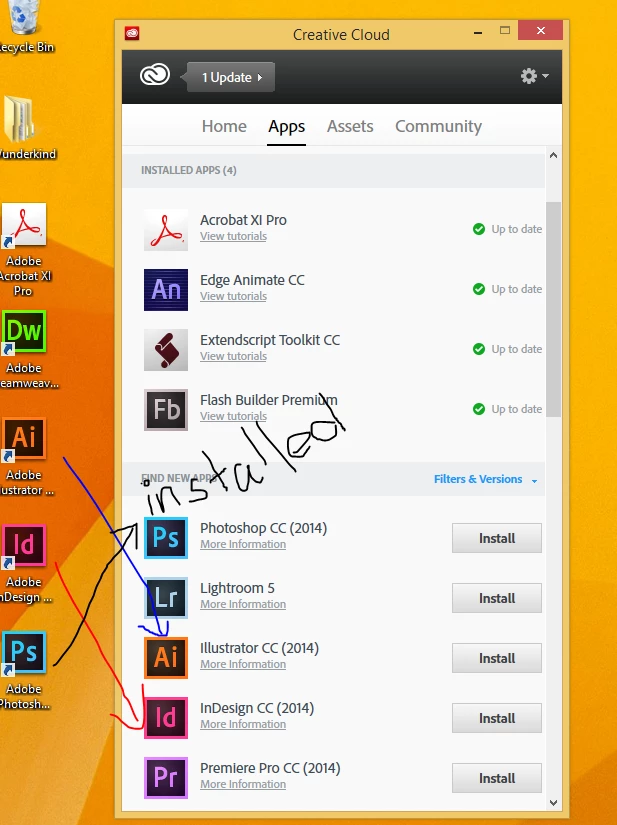
CCP installed softwares not detected by Creative Cloud app

  • August 21, 2014
  • 1 reply
  • 908 views

We've noticed this way back when Adobe Creative Cloud Packager was first launched but it's been getting annoying lately as our company has been hiring new staffs (like massively).

The repeating questions the tech support gets asked a lot is, why we haven't installed Photoshop or Illustrator or whatever software they need to use because the Creative Cloud App isn't able to detect them.

Some staff end up pressing 'install' again for every app, resulting in waste of bandwidth and time. We spend a lot of effort educating people but you can't cure stupidity.
This topic has been closed for replies.

1 reply

Ashubijalwan1
Adobe Employee
Adobe Employee
August 22, 2014

Creative cloud desktop app will not detect the package installation. The package created via creative cloud packager is a customized package hence it may not sync up with desktop app mostly in serial number licensed packages.

Thanks,

Ashish

MB_JamesAuthor
Inspiring
August 22, 2014

This has to change. Since Creative Cloud Desktop is required to download TypeKit fonts, users are bound to come across the 'installation' screen at some point.

Ashubijalwan1
Adobe Employee
Adobe Employee
August 22, 2014

Typekit and other creative cloud online services can be used if users have creative cloud for team license. These services are not the part of serial number license deployment. Users who have the creative cloud apps activated under named license deployment will be able to use online services through desktop app**.

Thanks,

Ashish