


Participating Frequently
February 8, 2018
Question

Complete package AcroRdrUpd180092044 - SCCM

  • February 8, 2018
  • 6 replies
  • 2004 views

I have downloaded the Zip files with the ADm template and the Customization Wizard etc..

I have extracted and now have a 2018.009.2044 folder I created with the files I need including an mst
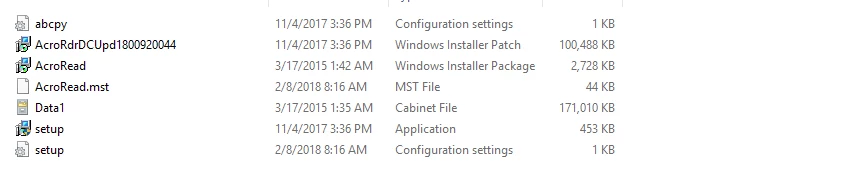
I have created my application in SCCM and it is deploying - I am pointing to the

"msiexec /i "AcroRead.msi" /qn TRANSFORMS=AcroRead.mst"

This is working fine but the end result is version 2015.007.20033 installed - I am wondering if I need to also get the AcrordrDCUpd1800920044.msp installed and if so should I be pointing at that initially or do I have to do this separately?

Help appreciated

This topic has been closed for replies.

6 replies

Participant
February 13, 2018

As already mentioned you need to add an additional call for the update.

I utilize the %~dp0 variable when deploying via SCCM.  https://stackoverflow.com/a/10290765

Here is mine to include todays update:

msiexec.exe /i "%~dp0AcroRdrDC1500720033_en_US.msi" TRANSFORMS="%~dp0AcroRdrDC1500720033_en_US.mst" /qn

timeout 5

msiexec.exe /p "%~dp0AcroRdrDCUpd1801120036.msp" /qn

Participating Frequently
February 9, 2018

Unable to locate or validate MSI package

Using command line as shown above - msiexec /i \\location\Acroread.msi /Update \\location\AcroRdr2017Upd1701130070_MUI.msp /qn TRANSFORMS="acroread.mst"

Adobe Employee
February 12, 2018

You will need to troubleshoot the command line.  Does the first part of the line work?  If yes, the add the second part of the line.   A word of advise as I ran into an issue that could be happening to you.  Do NOT cut and past the line into the Windows Command Prompt.  Instead type it.  I know it's a pain, but try it.  If it works then you know it was a problem with the text format that you attempted to past into the Windows Command Prompt.

Participating Frequently
February 9, 2018

Sorry, I do not understand your reference to "c:" - this is on a network drive on SCCM which only uses UNC

Adobe Employee
February 9, 2018

The "C:" is a local machine reference.  It is easily substituted by "\\" for a network reference. 

Adobe Employee
February 9, 2018

The answer is "Yes" and you need to change your install command line to get a co-heasive installation.  Instead of the install command line that you have, you can try this type of syntax.

Syntax

msiexec.exe /i C:\[PATH_TO_MSI_FILE]\AcroRdrDC1500720033_en_US.msi /Update C:\[PATH_TO_MSP_FILE]\AcroRdrDCUpd1800920050.msp /qn TRANSFORMS="AcroRead.mst"

Real World

msiexec.exe /i C:\Users\labuser\Desktop\AdobeReaderDC\AcroRdrDC1500720033_en_US.msi /Update C:\Users\labuser\Desktop\AdobeReaderDC\AcroRdrDCUpd1800920050.msp /qn TRANSFORMS="AcroRead.mst"