


Hiram_K_Hackenbacker
Participating Frequently
March 25, 2019
Question

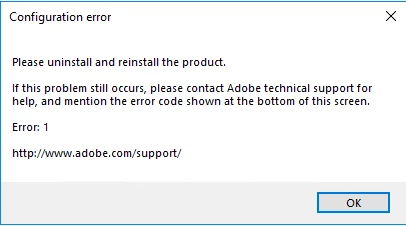
Configuration Error. Please uninstall and reinstall the product. Error: 1
  • March 25, 2019
  • 1 reply
  • 7389 views

This error box is now coming up on more and more machines in our organisation.  Although I have seen various forum posts for Errors 15 and 16, I have seen none for 1.  Even Adobe's own support site only mentions 15 and 16, and the fix for this is to correct the permissions on certain folders.  These folder permissions are correct on our installations.

We are running Creative Cloud 2018, and this occurs on all applications

Previously we fixed this by uninstalling and reinstalling on a few individual machines, but now the problem is becoming widespread.  Ideally we would like to understand the cause of this and prevent it, because remediating it after it has occurred is not a practical option, as we are a University with over 5,000 installations used by multiple students.

Any help would be appreciated.

DaveB

    1 reply

    kglad
    Community Expert
    Community Expert
    March 25, 2019

    uninstall everything cc including preferences, https://helpx.adobe.com/creative-cloud/help/uninstall-remove-app.html

    then uninstall the cc desktop app, https://helpx.adobe.com/creative-cloud/help/uninstall-creative-cloud-desktop-app.html

    clean your computer of cc files per http://www.adobe.com/support/contact/cscleanertool.html

    restart your computer (don't skip this)

    reinstall the cc desktop app, https://creative.adobe.com/products/creative-cloud.

    if you're unable to install the cc desktop app at this stage, use an administrator account (solution 4 here, https://helpx.adobe.com/creative-cloud/kb/creative-cloud-missing-damaged.html)

    use the desktop app to install your cc programs/trials

    [moved from Adobe Creative Cloud to Creative Cloud Download & Install]

    Hiram_K_Hackenbacker
    Participating Frequently
    March 25, 2019

    Thank-you for replying.  However while those instructions may be helpful on a single machine where the operating system needs retaining, our environment is completely different.  As pointed out in my initial post we have 5,000 machines in our student estate that potentially could be affected by this. They are in continual use by up to 20,000 Undergraduate students in any term and whilst we can take the odd few off-line to repair, we do not have anywhere near the number of IT staff to be able to follow those instructions.

    Since our students almost never use the same machine twice, and their User profiles are removed after 2 days anyway, we tend to completely re-image any student machines with issues, rather than attempt to repair individual apps. Our students are also completely unable to install, uninstall or reconfigure applications.

    We therefore do not need to fix what has gone wrong*, but rather identify the cause so we can prevent it happening.

    DaveB

    *Unless the fix is something simple and quick like a Registry change or removal /modification of a few files or configuration settings.

    kglad
    Community Expert
    Community Expert
    March 25, 2019