
Participant
April 18, 2025
Answered

Couldn't select administrative rights

  • April 18, 2025
  • 1 reply
  • 472 views

I have two organizations in Adobe, but I noticed a difference between them regarding administrative rights.

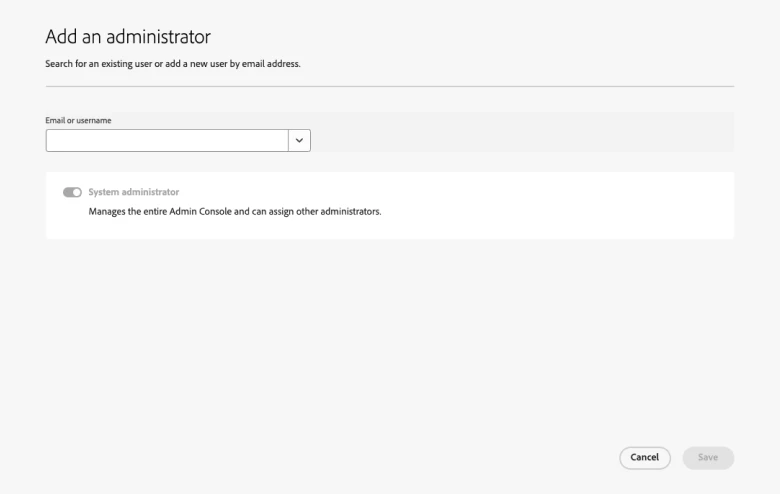
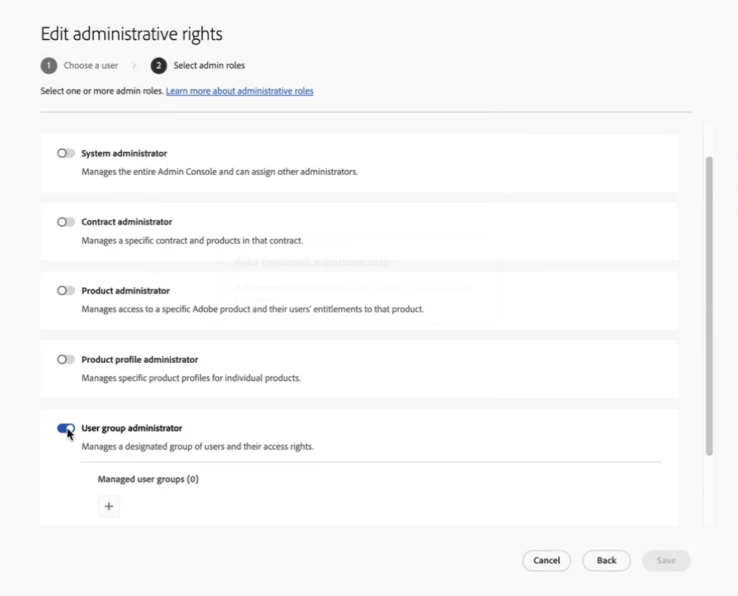
In one of the organizations, when assigning administrator permissions, only the System Administrator role is available. However, in the other organization, there are multiple administrative roles to choose from.

Could you help me understand what causes this difference?
Also, is there a way to enable or sync the multiple role options in the other organization as well?

Thank you!
Correct answer Anshul_Nautiyal

Hi @sandy_4167,


Thank you for confirming. After logging into the Adobe Admin Console, you can click on the account tab. In the account overview section, you will find the contract details. Adobe offers a range of contract types to support different organizational needs and budgets, such as ETLA, VIP, and Teams. For more information, refer to this documentation: https://adobe.ly/3Y4HpGW

If you are considering upgrading to an enterprise contract, we recommend contacting your account manager, who can assist with the transition.


Let us know if you have further questions.

Regards,
^AN

1 reply

Community Manager
April 18, 2025

Hi @sandy_4167,


Thank you for reaching out.

Based on your query, it appears that you can view only one admin role under one contract, while the other contract displays multiple admin role options. Please confirm if this is the issue you need assistance with.

This behavior is expected and typically occurs when one contract is a Teams plan and the other is an Enterprise plan. In a Teams contract, there is only a single System Administrator role available. As an admin, you can assign the System Admin role to other users, granting them the same level of access and privileges.

The contract owner (previously referred to as the Primary Admin) acts as the System Admin and has access to contract and billing information.

On the other hand, Enterprise contracts offer more flexibility and role-based access. Organizations can assign different admins to manage user entitlements across Adobe Creative Cloud and Adobe Experience Cloud products. This also allows for decentralized admin roles to support multiple business units or departments.

You can learn more about admin roles and their capabilities in this documentation:
Admin Roles in Adobe Admin Console

Please note: It is not possible to enable or sync multiple role options under a Teams contract. To utilize advanced admin role management, you would need to upgrade or migrate to an Enterprise contract.

Let us know if you would like guidance on upgrading to Enterprise or have any further questions.

Regards,
^AN

Participant
April 18, 2025

Hi @Anshul_Nautiyal 

Yes, that’s my question.

I’d like to know where I can check whether I’m currently on a Team or Enterprise plan.
Also, could you please let me know the process to upgrade to the Enterprise plan if needed?

Thank you!

Anshul_NautiyalCommunity ManagerCorrect answer
Community Manager
April 18, 2025

Hi @sandy_4167,


Thank you for confirming. After logging into the Adobe Admin Console, you can click on the account tab. In the account overview section, you will find the contract details. Adobe offers a range of contract types to support different organizational needs and budgets, such as ETLA, VIP, and Teams. For more information, refer to this documentation: https://adobe.ly/3Y4HpGW

If you are considering upgrading to an enterprise contract, we recommend contacting your account manager, who can assist with the transition.


Let us know if you have further questions.

Regards,
^AN