



Bani Verma
Legend
April 18, 2019
Answered

Creative Cloud "Activation limit reached" or "Sign-in failed" error

  • April 18, 2019
  • 1 reply
  • 1021 views

If you receive this error you can sign out from other computers where you may be signed in. In the following screen, choose 'Sign me out of the other computers so I can sign in here'.
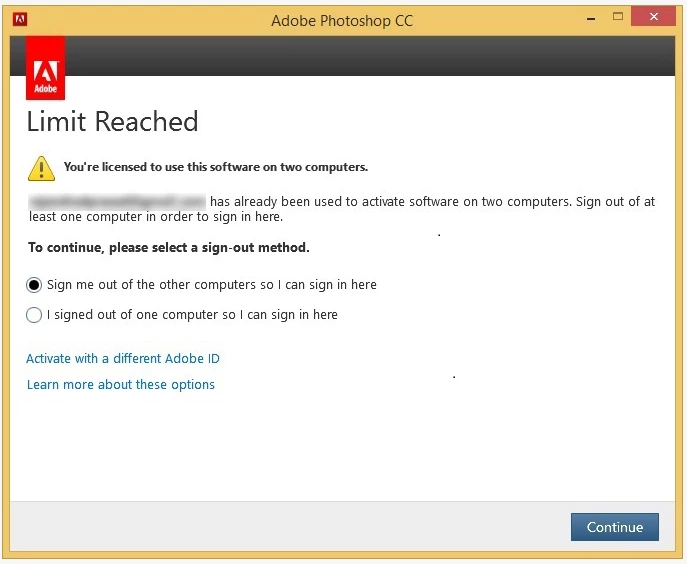
For more detailed troubleshooting steps see: Creative Cloud "Activation limit reached" or "Sign-in failed" error.

Hope this helps. Or let us know by adding a comment below.

This topic has been closed for replies.
Correct answer Bani Verma

Hi William, 


I have replied to your other post, please check: https://community.adobe.com/t5/enterprise-teams/activation-limit-reached-error-on-rds-acrobat/m-p/10945421?page=1#M26428.

1 reply

Participant
February 24, 2020

We have one user getting this error in a Remote Desktop environment, however the error message is for other users on the server. None of them are actually exceeding their limit, but for some reason it is trying to connect here user as one of them. If she chooses activate with a different ID it works, but it comes back after she logs out and the next time she launches Adobe.

Bani Verma
Bani VermaAuthorCorrect answer
Legend
February 25, 2020