


Participant
July 17, 2018
Answered

Creative cloud causing system memory to expand

  • July 17, 2018
  • 1 reply
  • 513 views

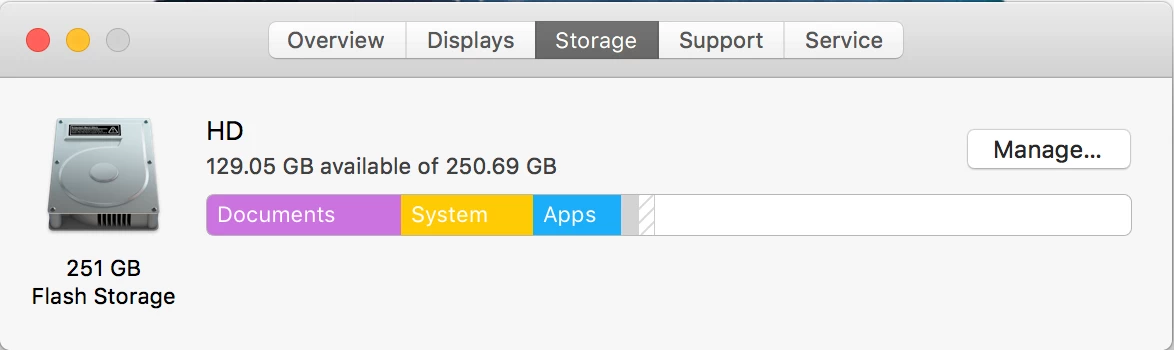
Hi ive set up a shared folder between my team using creative cloud team sharing. Initially no problem, several months in we have noticed that as the cloud folder becomes full (100gb capacity) there is a local folder that eats into hard drive space and in additionally the system memory on all the drive incrementally grow to the point that it fills the HD. So if you look at the below the contents of the cloud is added to the document space (not a problem by its self) but over time the system folder size increases and will fill the HD within 2 month without me ever adding or installing any new software or files, we work purely off the cloud.

What is causing this issue?? its apparent on both Mac and PC
    This topic has been closed for replies.
    Correct answer ___Dom___

    The "Creative Cloud Files" directory is a copy of all files which are stored in Creative Cloud's files area for the user which is logged in to the system. Archived files do not get copied to the system.

    If you have multiple users using a single workstation/laptop, unless they turn off Creative Cloud file sync, their files will also be copied to this directory within their user account.

    I hope I've addressed your question; you can find additional information here:

    Creative Cloud file storage and quota

    1 reply

    ___Dom___
    ___Dom___Correct answer
    Inspiring
    July 20, 2018

    The "Creative Cloud Files" directory is a copy of all files which are stored in Creative Cloud's files area for the user which is logged in to the system. Archived files do not get copied to the system.

    If you have multiple users using a single workstation/laptop, unless they turn off Creative Cloud file sync, their files will also be copied to this directory within their user account.

    I hope I've addressed your question; you can find additional information here:

    Creative Cloud file storage and quota