


Participating Frequently
July 31, 2017
Answered

Creative Cloud Desktop app 4.2.0.211 not available to Enterprise...

  • July 31, 2017
  • 23 replies
  • 4124 views

Hi Adobe,

when will this version be available to enterprise? I can't build it from Creative Cloud Packager.. keeps building the old version 4.1.1.202. Our Staff have restricted internet access and cannot update from the internet so they are now locked out of the application because it cannot be updated. any chance of an offline updater I could use if you are not going to update creative cloud packager?

I'm guessing this isn't a priority for you? the release notes haven't even been updated? lol, not a very funny joke.
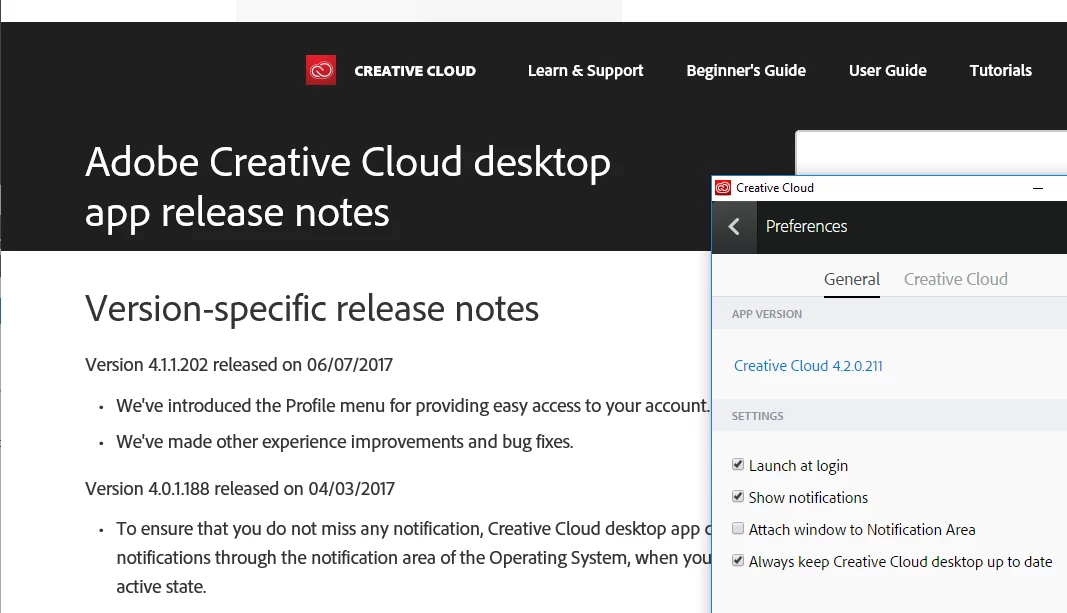
I'm glad adobe is so forward thinking when it comes to enterprise customers.

    This topic has been closed for replies.
    Correct answer rpandita

    Hi Everyone,

    You can also download the latest CCP from your Admin Console.

    ~Rohit

    23 replies

    Participant
    October 2, 2017

    Any updates on the enterprise release?

    rpandita
    Inspiring
    October 5, 2017

    Hi reed exhibitionr96371218,

    The update is now available in CCP.

    ~Rohit

    Participant
    September 26, 2017

    4.3.0.256 is not available... what a surprise...

    Jeffrey_A_Wright
    Legend
    September 26, 2017

    Peterw3672120 version 4.3.0.256 was just released worldwide on 9/26/17.  We always wait until after it is released to individual members before making it available to Enterprise or Team members.  There are plans to make the new version available very soon.

    For a complete list of the enhancements implemented, in version 4.3.0.256 of the Adobe Creative Cloud desktop application, see Release notes for the Adobe Creative Cloud desktop app .

    Participating Frequently
    August 25, 2017

    Packager has now been updated.

    Participant
    August 25, 2017

    Thanks for the heads up.

    Participant
    August 17, 2017

    It's completely ridiculous that it wasn't available on day zero. Three weeks and counting is a sick joke, surely..

    ___Dom___
    Inspiring
    August 11, 2017

    Our engineering team are working on the fix, but in the meantime the following workarounds should be possible:

    - if Creative Cloud applications are already installed, users should be able to open them via the Start Menu or with Spotlight and log into them in order to license their system

    - for systems which do not already have required applications installed, an enterprise sysadmin can download a package from the Admin Console, or you can create one using CCP; whilst it will still contain the previous version of the Creative Cloud Desktop application, it should permit users to run applications having logged in to them

    - assets can be accessed via the website: Adobe Creative Cloud

    Please log a support ticket via your Admin Console if any of these workarounds are not possible

    Apologies for the inconvenience.

    Participant
    August 17, 2017

    Has the packager been updated yet? If not is there a way I can get notified or check release notes to know when this occurs.

    rpandita
    Inspiring
    August 17, 2017

    Hi reed exhibitionr96371218,

    Not yet, however i have raised this request to the engineering, i will keep you posted once we have the build for the same.

    ~Rohit

    Participating Frequently
    August 7, 2017

    Hi Dominic,

    I have raised an Incident with our security team to add the exclusions/whitelist, an RFC will need to be raised and approved before this can be tested which will still be some weeks away. please let me know as soon as creative cloud packager/offline installer is updated.

    Thanks 

    Participating Frequently
    August 4, 2017

    Our proxy is locked down very heavily and clients also cannot download executables. last time this happen I just built the new version from Creative Cloud Packager I don't see why we cant just have the content updated.

    also the link to the adobe admin console; I cannot access "access denied"

    I've attempted to access it with our enterprise account which also fails.

    ___Dom___
    Inspiring
    August 4, 2017

    The version of Creative Cloud Desktop available via the packager will be updated in the next few days. In the meantime, I suggest adding an exception to your firewall for the specific servers if ZIP and XML files are not permitted to be downloaded.

    The servers used for the download are:

    ccmdls.adobe.com

    ccmdl.adobe.com

    Alternatively, you should be able to install via the bootstrap installer by manually downloading it from the following page and copying it to the relevant machines to perform the update:

    https://creative.adobe.com/products/creative-cloud

    Participant
    August 9, 2017

    Hi Dominic,

    Do you know the release date of the 4.2.0.211 in Creative Cloud Packager?

    Actually its always the 4.1.1.202, while the 4.2.0.211 is release since 10days in force updates, who have crashed ours 100 installs.

    Thanks.

    Participating Frequently
    August 3, 2017

    how do I escalate this issue?

    I'm from Department of Communities, Child safety and Disabilitys Services, Queensland Government.

    can I speak to our Account Manager?

    ___Dom___
    Inspiring
    August 3, 2017

    Please log a case via your Admin Console at the following address detailing the urgency of the issue:

    Adobe Admin Console

    Are users able to run their already installed Adobe applications via the Start Menu? What kind of blocking is in place, e.g. firewall rejects requests to all hosts apart from a whitelist of allowed servers, or are specific servers blacklisted?

    rpandita
    Inspiring
    July 31, 2017

    Hi adamm31029077

    You already have the latest version , please check the link again - Release notes for the Adobe Creative Cloud desktop app

    ~Rohit

    Participating Frequently
    August 1, 2017

    Hi Rohit,

    yes I have the latest version because I can update from the internet because I'm an administrator... the other 60 staff members do not have permissions to download from the internet so I need to deploy it via Microsoft System Centre Configuration Manager. Can you guys please update the content in Creative Cloud Packager so I can build an MSI package.