


Chre
Inspiring
October 29, 2020
Answered

Creative cloud desktop crashes on windows 7

  • October 29, 2020
  • 3 replies
  • 2022 views

Hi all,

Since october 26, 2020, we have 4 workstations with MS Windows 7 SP#1 updated who Adobe Creative Cloud Desktop crashes repetitively. It's an important issue for us because we have around 150 workstations with Adobe CC. Before that, Adobe CCD works fine on the same computers.


We have made a test with new computer with fresh install of MS Windows 7 sp#1, same issue.

The error:

Signature du problème :
Nom d’événement de problème: APPCRASH
Nom de l’application: Adobe Desktop Service.exe
Version de l’application: 5.2.1.441
Horodatage de l’application: 5f11e7c0
Nom du module par défaut: AppsPanelBL.dll
Version du module par défaut: 5.2.0.436
Horodateur du module par défaut: 5eee1316
Code de l’exception: c0000005
Décalage de l’exception: 001b1013
Version du système: 6.1.7601.2.1.0.256.4

Keys <ctrl>+<alt>+R does nothing.

Reinstall of Adobe Creative Cloud Dekstop does nothing.


Our Adobe Creative Cloud Desktop is version 5.2.1.1441, Apps 5.2.0.436, Coresync 4.2.7.2, CCX Process 3.0.0.41, C CLibratry 3.2.3.545


Any help?

Regards.
This topic has been closed for replies.
Correct answer SuJoshi

Hi all, hi @SuJoshi 

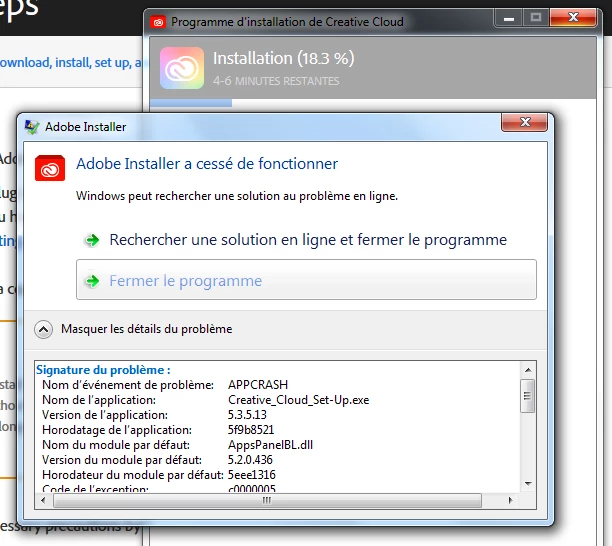
An coworker and I have made some tries yesterday and today. Adobe creative cloud desktop is always broken on MS Windows 7. On fresh install with new download of Adobe creative cloud desktop setup, we encounter an crash when we install:


Signature du problème :
  Nom d’événement de problème:	APPCRASH
  Nom de l’application:	Creative_Cloud_Set-Up.exe
  Version de l’application:	5.3.5.13
  Horodatage de l’application:	5f9b8521
  Nom du module par défaut:	AppsPanelBL.dll
  Version du module par défaut:	5.2.0.436
  Horodateur du module par défaut:	5eee1316
  Code de l’exception:	c0000005
  Décalage de l’exception:	001b1013
  Version du système:	6.1.7601.2.1.0.256.4
  Identificateur de paramètres régionaux:	1036
  Information supplémentaire n° 1:	0a9e
  Information supplémentaire n° 2:	0a9e372d3b4ad19135b953a78882e789
  Information supplémentaire n° 3:	0a9e
  Information supplémentaire n° 4:	0a9e372d3b4ad19135b953a78882e789


Our issue it is not solved yet.

Well, bad things in our French health confinement.


As per the document, the creative cloud desktop app is not supported on Windows 7 devices. I found this article for support on Windows 7 operating system: https://helpx.adobe.com/in/download-install/kb/end-of-support-creative-cloud-on-windows-7.html.


If the issue is coming on multiple Windows 7 devices then you can contact the support team by creating a case from the admin console and they might be able to find the root cause of the issue however, there might be a limitation to the support.

Also, check if the issue is coming when using the local admin account or the system admin.

3 replies

boo_mobile
Participating Frequently
December 17, 2020

New version won't solve the issue, unless you make it backwards compatible. This is exactly what I warned my collegues about! I wish we could go back to the box versions that lasted 10 years without any issues. Much cheaper too....

Chre
ChreAuthor
Inspiring
November 17, 2020

Hi all,

Any news from anywhere? 😞 No thanks, Adobe!

At least, where can we found Adobe Creative Cloud Desktop older releases?

Community Manager
November 19, 2020

Hello,

I apologize for the inconvenience caused to you. 

There might be a new version of the creative cloud desktop app available in the admin console. I would recommend creating a new package from the admin console, install it, and check if the issue persists.

boo_mobile
Participating Frequently
December 17, 2020

This doesn't address the issue. Not a correct answer. Sorry!

John T Smith
Community Expert
Community Expert
October 29, 2020
Chre
ChreAuthor
Inspiring
October 29, 2020

It is an too easy answer and you can't close this topic instead of us.

We know that, but Adobe CCD work well since october 26, why it can't now?

Maybe some others users have same issue with us and can help?

It is possible to download some previous Adobe Creative Cloud Desktop who run perfectly before that?

We will move to MS Windows 10 but only at the end of 2021.

Chre
ChreAuthor
Inspiring
October 30, 2020

Hi all here,

It is hard to undestanding that is any answer about our issue 😞

Maybe it is possible to download old release of Creative cloud desktop somewhere in Adobe's website?