


whitneyc70788422
Participant
June 24, 2019
Answered

Creative Cloud doesn't show the newest versions available to download.

  • June 24, 2019
  • 1 reply
  • 970 views

Creative Cloud doesn't show the newest versions to download.  I checked my systems settings/requirements and compatibility settings and everything seems fine.  I am running on windows 10. It is a huge problem trying to work in documents my whole office is working in if I don't have the latest version.

This topic has been closed for replies.
Correct answer Vikrant R

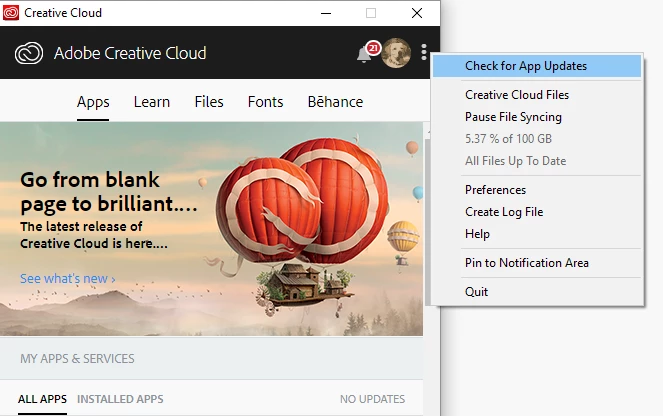
The Creative Cloud desktop app should automatically refresh and display the latest versions of the apps. Could you try the following:

In the CC desktop app, from the menu choose Check for App Updates.

If that doesn't help, It might make sense to talk to your IT Admin to understand how the desktop app and packages are configured.

Anyway, could you post a screenshot of what apps you see in your desktop app.

- Let us know the version of the desktop app, by choosing Preferences from the menu.

- Let us know the exact version of Win10. From the Start menu, choose Settings > System > About. Under the Windows Specifications sections, look for Edition and Version.

1 reply

Vikrant R
Vikrant RCorrect answer
Inspiring
June 25, 2019

The Creative Cloud desktop app should automatically refresh and display the latest versions of the apps. Could you try the following:

In the CC desktop app, from the menu choose Check for App Updates.

If that doesn't help, It might make sense to talk to your IT Admin to understand how the desktop app and packages are configured.

Anyway, could you post a screenshot of what apps you see in your desktop app.

- Let us know the version of the desktop app, by choosing Preferences from the menu.

- Let us know the exact version of Win10. From the Start menu, choose Settings > System > About. Under the Windows Specifications sections, look for Edition and Version.