



Ivan FIlipov
Known Participant
Mar 2, 2020 11:27 AM UTC
Answered

Creative Cloud Libraries : Unable to connect to server

Hello

I tried everything described here:
https://helpx.adobe.com/creative-cloud/kb/libraries-panel-not-working.html
and here:

https://community.adobe.com/t5/get-started/cc-libraries-sync-error/m-p/10901142?page=1#M452989

but no luck. The Libraries are working locally but not syncing to cloud - not good when 12 people are using the same libraries and store files there.
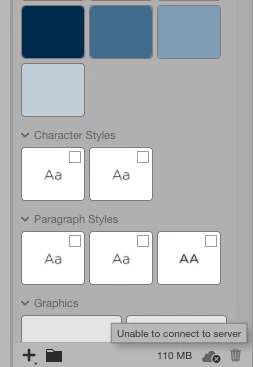
 

Any help with this will be appreciated!!!

This topic is closed to new replies. Start a new post to keep the conversation going.
supkatCorrect answer
Adobe Employee
Mar 10, 2020 3:09 PM UTC

This is really annoying. Libraries are practically useless if they cannot be synced. Where do I file an support ticket or Adobe has no official support? It's not like we are PIRATING your software, so I think we're entitled on some decent support?!?!?


Hi Evan,


I’m sorry to hear that you’re still unable to sync your Libraries. I sent you a private message.


Can you please confirm do you use any proxy settings for your organization?


Thanks,

Supriya

13 replies

Known Participant
Mar 3, 2020 7:42 PM UTC

Even more maddening, when I try to access the cloud library it tells me to sign in even tho' I am signed in. I can see my Creative Cloud library in https://assets.adobe.com/libraries, yet I'm not signed in to the desktop app. What gives?

Translate
Adobe Employee
Mar 5, 2020 7:47 AM UTC

Hi,


I would recommend you reinstall your Libraries. Could you please try next:
1. Delete all folders that start with “CC_LIBRARIES_PANEL_EXTENSION_xx_xx_xx” in this location:
WIN: C:\Program Files (x86)\Common Files\Adobe\CEP\extensions
MAC: Macintosh HD⁩ ▸ ⁨Library⁩ ▸ ⁨Application Support⁩ ▸ ⁨Adobe⁩ ▸ ⁨CEP⁩ -> extensions
2. Follow the steps of Solution 2 in this article:
https://helpx.adobe.com/creative-cloud/kb/libraries-panel-not-working.html
Before trying the steps in the article - please, make sure you killed the CCLibraries process in Task Manager / Activity Monitor, as well as you have quit all Adobe related products. This is mentioned in steps 1 and 2 of the article linked in step 2 but wanted to point out because it is important.

If it does not help you. Could you please collect logs as I described in Ivan_FIlipov reply.


Thank you,
Supriya Katiyar
CCLibraries Team

Translate
Ivan FIlipov
Known Participant
Mar 5, 2020 11:27 AM UTC

Unfortunately, reinstalling and everything else has been a temporary cure. As of today morning the situation is back to square one.


Translate
Adobe Employee
Mar 3, 2020 6:34 PM UTC

Hi,

We would like to investigate this problem and if you could share logs from your machine, this would be very helpful. Here is a link to Adobe Log Collector Tool:
https://helpx.adobe.com/creative-cloud/kb/cc-log-collector.html
You'll get a zip file generated, could you please send the name of it?
It will be something like "AdobeLogs_20191011_081024_xxx-win.zip"
This might help us to understand the root cause of the problem.

Thank you,

Supriya Katiyar
CCLibraries Team

Translate
Ivan FIlipov
Known Participant
Mar 4, 2020 7:36 AM UTC

Thanks. I will attach it to this reply. Meanwhile, this morning everything started syncing... at least on my Mac, the rest of the team is still "Unable to connect to server". I guess I must gather their logs too....


AdobeLogs_20200304_092757_755-mac.zxp


Let me know please

Translate