diane  k87135485
Participant
August 28, 2017
Answered

Creative Cloud Packager

  • August 28, 2017
  • 3 replies
  • 412 views

I have packaged Illustrator with the CCP, but when I deploy it to the students they can install, but not open.  Last year when I deployed them I used a .dmg, this year I am getting .pkg and I am not seeing where I can change it.  Would that be the problem?

[Moved to Deployment forum... Mod]

    This topic has been closed for replies.
    Correct answer rpandita

    Hi there,

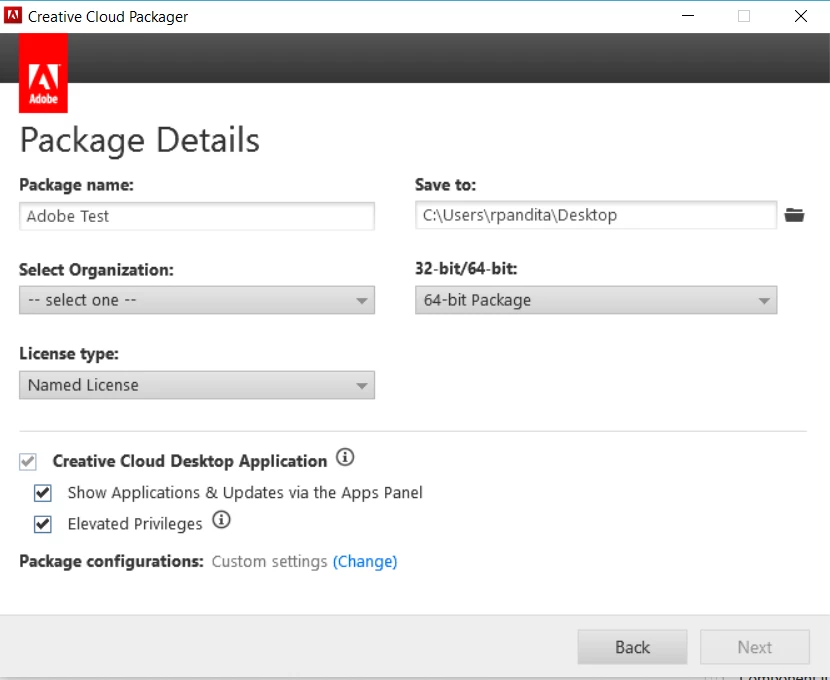
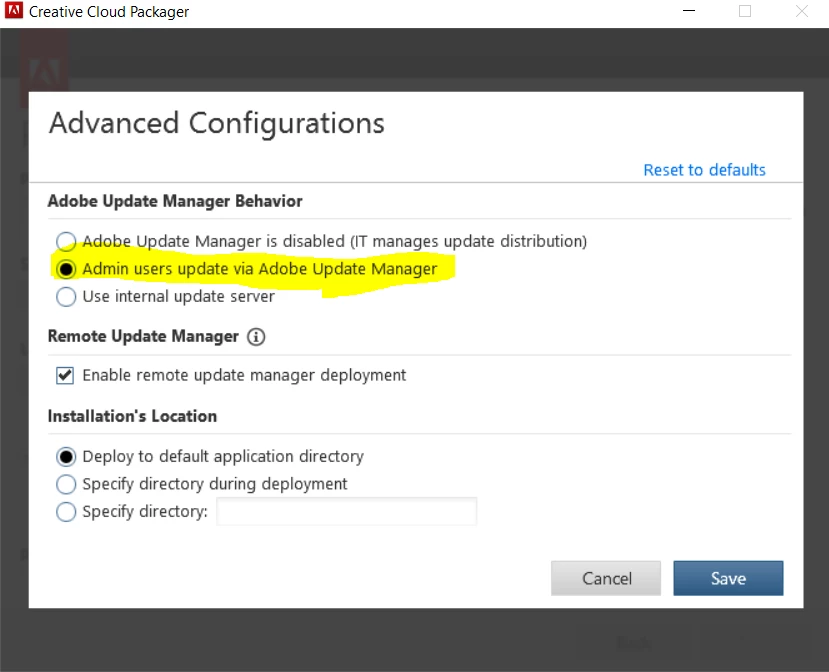
    You probably need to create a new package with the following settings/configuration.

    ~Rohit

    3 replies

    rpandita
    Inspiring
    August 28, 2017

    Hi diane k87135485,

    What were the settings that you choose while creating the package ?

    Do the students have admin rights ?

    What happens when they try to open AI?

    Have they tried to open AI using Admin rights ? (Right lick on the AI icon and then click Run as admin)

    ~Rohit

    diane  k87135485
    Participant
    August 28, 2017

    I'm not sure what you mean by setting while creating the package.

    The students do NOT have admin rights.

    When they try to open it just goes away.

    I deployed it to a teacher with admin rights and he was able to run it ok.

    I did this last year with PS and InDesign without any problems.  Can't figure out what I may have done differently.

    rpandita
    rpanditaCorrect answer
    Inspiring
    August 28, 2017

    Hi there,

    You probably need to create a new package with the following settings/configuration.

    ~Rohit