


Inspiring
February 22, 2017
Answered

Creative Cloud Packager Fails during build

  • February 22, 2017
  • 2 replies
  • 977 views

I created a package before and when I attempt to create another package, I select the wanted applications and once the package start to build, it stops at 1% with the following error, "Invalid Download file, please try to create file again." I've cleared my cache, rebooted the system, restarted the packager, uninstalled & reinstalled cloud packager, all with no luck. I attempted to look through MANY threads on Google, and Adobe's forum, but could not find anything that matched my issues as I'm working with only one package, and with the enterprise packager.
    This topic has been closed for replies.
    Correct answer quentins28655812

    Hi,

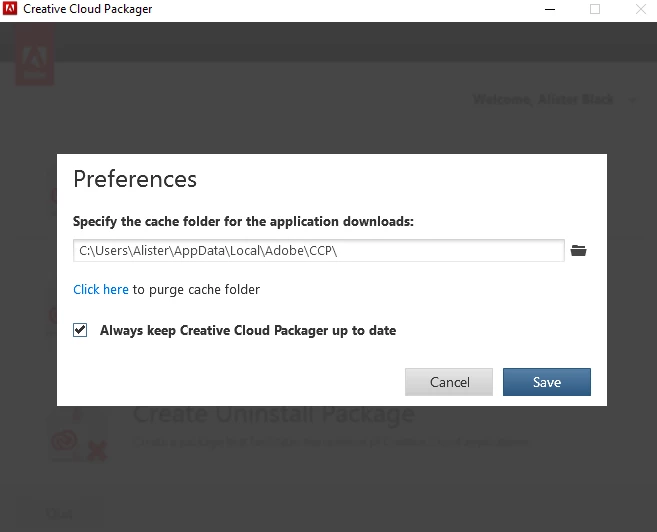
    I just want to check that the cache you cleared was the CCP cache (rather than the browser cache). You will find this under the Preferences.

    You can also navigate manually to the cache folder and remove items.

    It does sound like there is some corrupt data in there.


    CLASSIFICATION: UNCLASSIFIED

    It would seem that my supervisor has decided to just use the original package and continue to deploy, so I'm going to close this thread. Thanks all for your support. I know that I'll be revisiting this in the very near future!

    R,

    Quentin

    2 replies

    alisterblack
    Inspiring
    February 22, 2017

    Hi quentins28655812,

    What are you trying to include in your package? All applications? Can you try with maybe a smaller group or even one application to see if that works, it will help narrow down the issue.

    Inspiring
    February 22, 2017

    Yes, I was attempting to create a package containing all the applications as I'd done earlier. I took your advice and attempted to create a smaller package (single app - Light Room) and get the same results.

    alisterblack
    Inspiring
    February 23, 2017

    Hi,

    I just want to check that the cache you cleared was the CCP cache (rather than the browser cache). You will find this under the Preferences.

    You can also navigate manually to the cache folder and remove items.

    It does sound like there is some corrupt data in there.

    kglad
    Community Expert
    Community Expert
    February 22, 2017