


Participating Frequently
September 16, 2015
Question

creative cloud packager 'unable to upload your package metadata'

  • September 16, 2015
  • 1 reply
  • 466 views

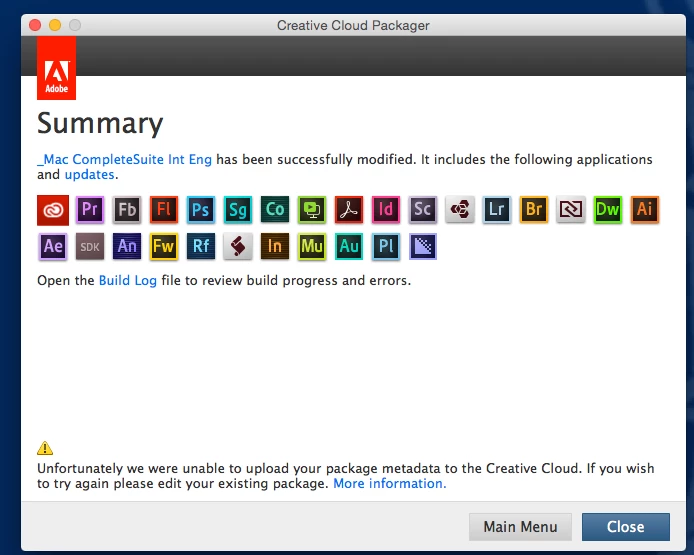
Any solution to this error 'Unfortunately we were unable to upload your package metadata to the Creative Cloud. If you wish to try again please edit your existing package' , I raised a support call for this in August and again today - see screenshot.

This error occurs:

  • when creating a new package
  • when editing an existing package
  • Under both Mac and Windows
  • Under any of the three unique Admin accounts all of which have been registered in the Dashboard
  • On any workstation (Mac or Windows) under any Admin login.

Any suggestions?

Cheers

Phil
    This topic is closed to new replies. Start a new post to keep the conversation going.

    1 reply

    Ashubijalwan1
    Adobe Employee
    Adobe Employee
    September 16, 2015

    Hi Phil,

    You just submitted a case via enterprise dashboard for this issue which is being reviewed by our support team. We tried replicating the issue at our end however we were able to upload the package metadata. You can check your dashboard for new package entries and a test entry will be there.

    I assume, you are creating a package on a machine which has Adobe apps installed. It is recommended that Creative Cloud Packager should not be installed on a system where one or more Creative Cloud products or Creative Cloud Manager products have been installed.

    Please check our response in your support case and we would be happy to assist you further.

    Thanks,
    Ashish