


James-NLH
Participant
May 11, 2015
Question

Creative Cloud Packager - Unable to upload your package metadata

  • May 11, 2015
  • 10 replies
  • 1558 views

I've built two packages using the tool and have received this error:

"Unable to upload your package metadata"
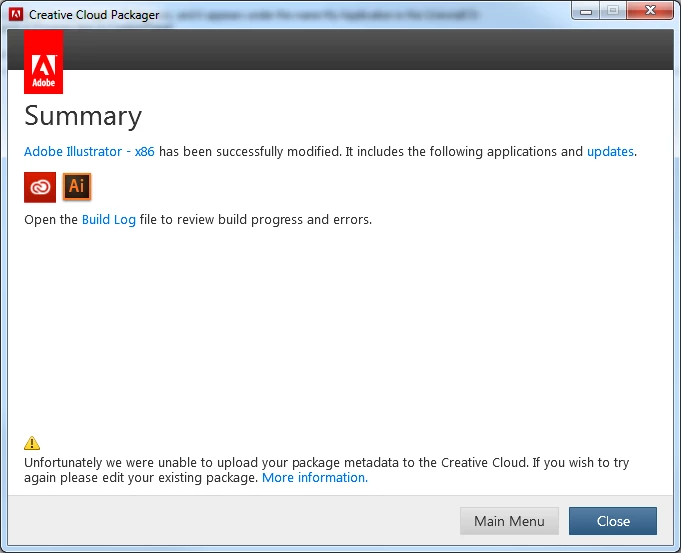
Build Log:

5/11/2015 15:26:45[INFO] AdobePackageBuilder - Build Version - 1.9.0.14

5/11/2015 15:26:45[INFO] AdobePackageBuilder - Logging Level verbosity Set  to 4

    This topic is closed to new replies. Start a new post to keep the conversation going.

    10 replies

    Participating Frequently
    September 16, 2015

    Did anyone ever offer a solution for this issue?

    I had raised a support call for this 3 or 4 weeks ago and was eventually told to try again and it worked, I was not given any explanation for the cause - either way its back again and I cannot create new or update existing packages, the log file offers no clue as to what is going wrong and links to a basic Q&A support page which does not cover this issue.

    Any clues, anyone?

    Cheers

    Phil

    AJ11
    Participant
    February 2, 2016

    We too are having this issue and have discovered the following cause:

    Our 3rd party (Cisco) general internet proxy firewall is automatically blocking the following URL (reason - Cisco has deemed this an 'update' URL - only accessible through their admin/update proxy)

    This in turn also results in us not being able to view package/deployment details on the Dashboard. We proved this through launching the dashboard with the admin/update proxy enabled, and were able to see the older package details. Packages created before this change was made.

    We are currently getting a change request raised to white list this newish network endpoint on our general proxy.

    Hope this helps.

    Carpetfluff
    Participant
    June 16, 2015

    Did this get fixed for anyone? I'm still getting this error.

    K Gibson
    Adobe Employee
    Adobe Employee
    June 19, 2015

    This issue has been fixed. Is the error on a new package or existing package ? Can you please send a screen grab ?

    Cheers

    Karl Gibson | Product Manager | Enterprise IT Tools

    Participant
    May 19, 2015

    We also got this same error now.

    K Gibson
    Adobe Employee
    Adobe Employee
    May 19, 2015

    Hi,

    This is due to a server side issue. We are hoping to apply a fix this week. Once the fix is applied if you modify your existing package but select nothing additional the metadata will again upload to the server. Apologies for the inconvenience.

    Cheers

    Karl Gibson | Product Manager | Enterprise IT Tools

    K Gibson
    Adobe Employee
    Adobe Employee
    May 27, 2015

    Hi,

    We have just deployed a server fix for this issue and after testing it looks fine. Please let us know if you are still experiencing this issue. As above to have the metadata of previous failed packages upload to the dash board you just need to edit it and select nothing.

    Cheers

    Karl Gibson | Product Manager | Enterprise IT Tools

    Ashubijalwan1
    Adobe Employee
    Adobe Employee
    May 12, 2015

    Hi James,

    We are investigating on this, in the meantime, can you please sign out from CCP and sign in back to create a new package?

    Let me know if you get the same error again.

    Thanks,
    Ashish

    James-NLH
    James-NLHAuthor
    Participant
    May 12, 2015

    Hi,

    This is still happening. Thank you.