Participant
November 15, 2024
Answered

Creative Cloud Shared Devices Selfservice

  • November 15, 2024
  • 1 reply
  • 333 views

Hello

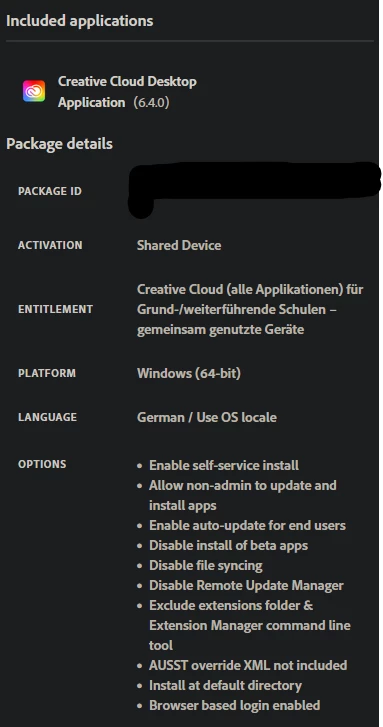
We are using Selfservice Creative Cloud packages with a Shared Device License in our environment.


Since the last update of the Creative Cloud, all users receive a UAC and can no longer open the Creative Cloud.
Why does this UAC appear?
Creative Cloud should be able to update itself without admin rights?

Kind Regards
Pascal

This topic has been closed for replies.
Correct answer Anshul_Nautiyal

Hi @pascal_5230,

Thank you for reaching out. Based on your description, I recommend the following steps to address the issue:

Update OS: Ensure all pending OS updates are installed and verify if the issue started after a recent update.


Reinstall CCDA and Create a New SDL Package: To rule out corrupted configurations, please uninstall and reinstall the Creative Cloud Desktop App on the affected machine. Additionally, create and deploy a new SDL package from the Adobe Admin Console to test for any issues with the current deployment. After completing the installation, please confirm whether you are still encountering UAC prompts.


Please verify the environment configuration, as firewall or group policy restrictions may be preventing the Creative Cloud Desktop App (CCDA) from updating itself. 


If these suggestions do not resolve the issue please let us know we will proceed with additional troubleshooting steps.

 

Regards,
^AN

1 reply

Anshul_NautiyalCommunity ManagerCorrect answer
Community Manager
November 15, 2024

Hi @pascal_5230,

Thank you for reaching out. Based on your description, I recommend the following steps to address the issue:

Update OS: Ensure all pending OS updates are installed and verify if the issue started after a recent update.


Reinstall CCDA and Create a New SDL Package: To rule out corrupted configurations, please uninstall and reinstall the Creative Cloud Desktop App on the affected machine. Additionally, create and deploy a new SDL package from the Adobe Admin Console to test for any issues with the current deployment. After completing the installation, please confirm whether you are still encountering UAC prompts.


Please verify the environment configuration, as firewall or group policy restrictions may be preventing the Creative Cloud Desktop App (CCDA) from updating itself. 


If these suggestions do not resolve the issue please let us know we will proceed with additional troubleshooting steps.


Regards,
^AN