



Angelworks42
Participant
March 30, 2020
Answered

Creative Cloud Uninstaller "can't uninstall creative cloud for desktop"

Trying to do this silently, but of course it won't - because reasons. I included a screenshot to show there's no other adobe apps installed.
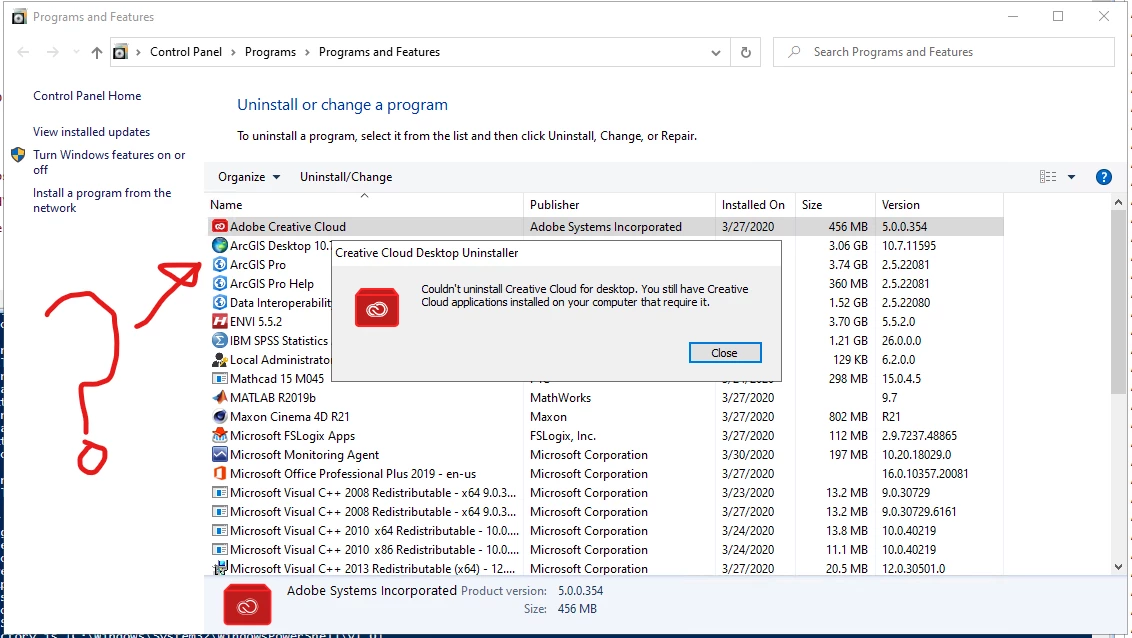


On a side note - I had to script a good number of creative cloud apps because the main installer doesn't remove them either. I would give adobe my next months salary if they actually made an uninstaller that actually did just that (removed all the components - not just like 90% of them).

This topic is closed to new replies. Start a new post to keep the conversation going.
SuJoshiCorrect answer
Community Manager
March 31, 2020

Hello, 

  1. We generally recommend the admin to create uninstaller package using the creative cloud packger to remove/uninstall CC apps. Please check this help document: https://helpx.adobe.com/in/enterprise/package/help/create-uninstall-package.html.
  2. You can also use creative cloud cleaner tool to remove the installed CC apps. Kindly check the complete document: https://helpx.adobe.com/in/creative-cloud/kb/cc-cleaner-tool-installation-problems.html.


Hope, this will fix your issue.

2 replies

Nikhil R Gupta
Legend
April 1, 2020

Hello,
You can use the Creative Cloud desktop uninstaller to uninstall the desktop client.
https://helpx.adobe.com/in/creative-cloud/help/uninstall-creative-cloud-desktop-app.html#uninstall_windows

As mentioned in the last comment you can also use the Creative cloud cleaner tool to uninstall multiple applications.

https://helpx.adobe.com/in/creative-cloud/kb/cc-cleaner-tool-installation-problems.html#RemoveallorselectedproductsEnterpriseusersonly

You can use the xml method as well which is only for Enterprise customers. Reference video  (https://www.youtube.com/watch?v=iRbludtPQd8)

Thanks,

Nikhil Gupta

Translate
SuJoshiCommunity ManagerCorrect answer
Community Manager
March 31, 2020

Hello, 

  1. We generally recommend the admin to create uninstaller package using the creative cloud packger to remove/uninstall CC apps. Please check this help document: https://helpx.adobe.com/in/enterprise/package/help/create-uninstall-package.html.
  2. You can also use creative cloud cleaner tool to remove the installed CC apps. Kindly check the complete document: https://helpx.adobe.com/in/creative-cloud/kb/cc-cleaner-tool-installation-problems.html.


Hope, this will fix your issue.

Translate