



CS5 Design Std serial number not valid
Hi,
I'm trying to move a CS5 Design Std software to a new computer, steps taken:
- On the old PC, opened software and then Help > Deactivate. Choosing permanent. When I try to open one of the software's in the suit I get the promt for trial or licensing. So the software seems to successfully been deactivated.
- Downloaded the software to the new computer from this site. Download Adobe Creative Suite 5 products
The two files under "CS5 Design Standard" for Windows.
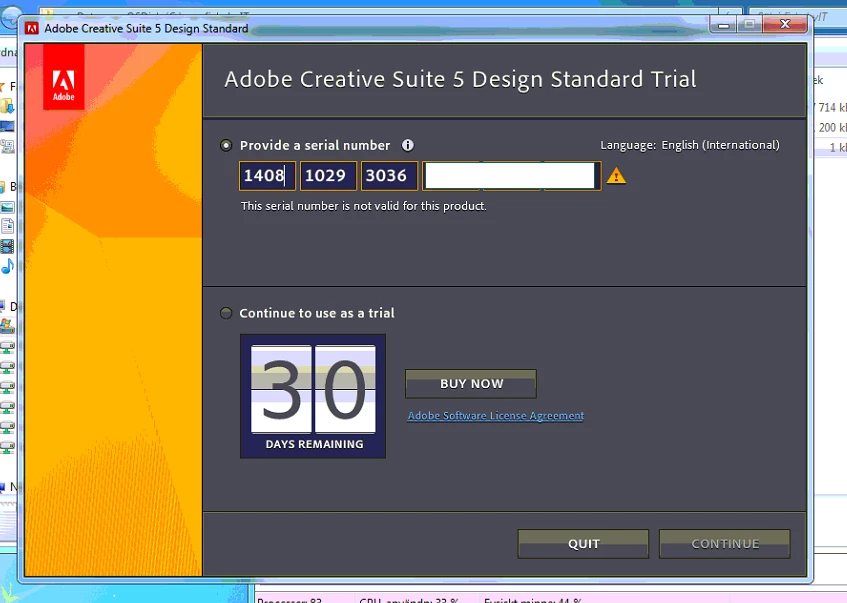
- After the installation on the new computer I get the trial / license window as expected. But when entering my serial number from the Software License Certificate paper I get a waring triangle and "This serial number is not valid for this product.".
- Iv'e been in contact with Adobe Chat support, just saying there is no live support for this product anymore and transfers me to this forum instead.
It's a company license for one installation, if I read it right.
Complete SKU Description on my Software License Certificate
"Adobe Design Std CS5 5.0 WIN AOO License S (65058002)" Quantity 1 Following one serial for WIN and MAC.
We really need this installation on the new computer, as we do all businesses cards and work-ads to newspapers in it. How do I proceed?
//Tobias

 AdChoices