
rossdc
Participating Frequently
October 29, 2012
Answered

CS5 Uninstall Bottleneck?

  • October 29, 2012
  • 1 reply
  • 1260 views

Now that I'm successfully up and running hot with my CS6 subscription -- very cool, Adobe, by the way -- I need to uninstall my CS5 to free up sorely needed space on my boot drive where Applications live.  Yes, I'm a video guy ...

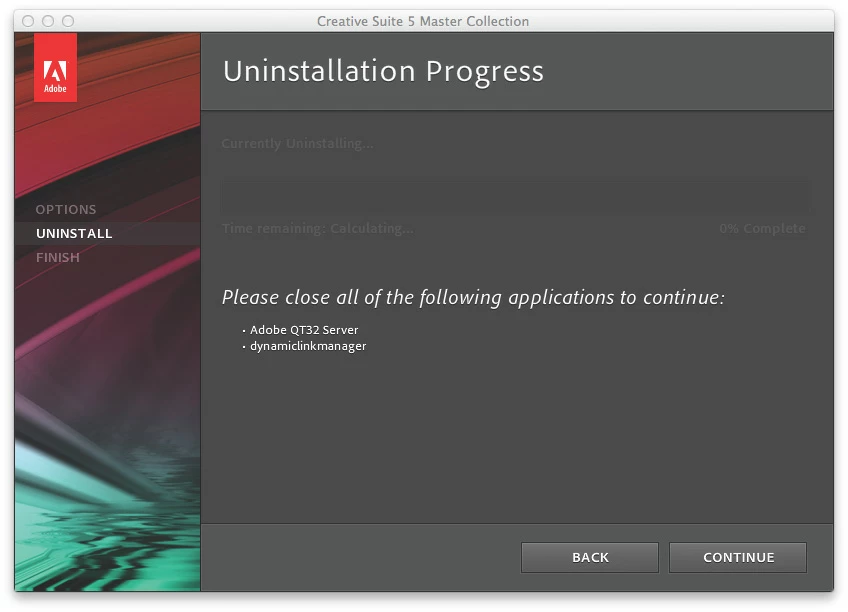
I invoked Adobe Application Manager and selected all the CS5 programs I want to uninstall -- keeping SoundBoooth CS5 for now.  But as it goes about uninstalling, I get a dialog telling me to close "Adobe QT32 Server" and "dynamiclinkmanager."

All my CS applications are closed, per the instruction. I certainly cannot find these two items to close manually.  What the what do I do now to uninstall my CS5s?

Seaprately but related:  When I opened PrPro CS6 and edited a video file, I got a dialog saying a freshened Media Encoder was available and I should Update from Help/Updates. When I attempted that, I again got "close Adobe QT32 Server" but now also "close AdobeCrashDaemon."  Neither of which can I even find.

Curiously,

DCR

= = = =
This topic has been closed for replies.
Correct answer Don Montalvo

A reboot should fix things...that's assuming you video guys ever reboot. But wouldn't you want to remove the old versions first, then install the new version? Maybe I'm being paranoid, but I wouldn't want to touch the Mac with any uninstaller after CS6 is put on it.

Manually remove CS2 | Mac OSX

http://helpx.adobe.com/creative-suite/kb/manually-remove-cs2-mac-osx.html

Remove Creative Suite 3 and CS3 products

http://helpx.adobe.com/creative-suite/kb/remove-creative-suite-3-cs3.html

Uninstall Creative Suite 4 and point products (Mac OS X)

http://helpx.adobe.com/creative-suite/kb/uninstall-creative-suite-4-point.html

Uninstall Creative Suite | CS5, CS5.5

http://helpx.adobe.com/creative-suite/kb/uninstall-creative-suite-cs5-cs5.html

Adobe Creative Suite Cleaner Tool

http://www.adobe.com/support/contact/cscleanertool.html

1 reply

Don Montalvo
Don MontalvoCorrect answer
Inspiring
October 29, 2012

A reboot should fix things...that's assuming you video guys ever reboot. But wouldn't you want to remove the old versions first, then install the new version? Maybe I'm being paranoid, but I wouldn't want to touch the Mac with any uninstaller after CS6 is put on it.

Manually remove CS2 | Mac OSX

http://helpx.adobe.com/creative-suite/kb/manually-remove-cs2-mac-osx.html

Remove Creative Suite 3 and CS3 products

http://helpx.adobe.com/creative-suite/kb/remove-creative-suite-3-cs3.html

Uninstall Creative Suite 4 and point products (Mac OS X)

http://helpx.adobe.com/creative-suite/kb/uninstall-creative-suite-4-point.html

Uninstall Creative Suite | CS5, CS5.5

http://helpx.adobe.com/creative-suite/kb/uninstall-creative-suite-cs5-cs5.html

Adobe Creative Suite Cleaner Tool

http://www.adobe.com/support/contact/cscleanertool.html

rossdc
rossdcAuthor
Participating Frequently
October 29, 2012

So ... obviously you know some video guys ...  

I thought to try that, of course -- but stopping every-darn-thing to do that, hope it worked for the minor return, and restarting all the workflow wasn't worth the time cost just then.  I'll try that after my encoding is done in a few hours and let you know how that worked.

Many thanx.

Don Montalvo
Inspiring
October 29, 2012

rossdc wrote:

So ... obviously you know some video guys ...  

LOL...yea, we've got several hundred AVID/FCP/Premiere users...