


Participant
January 5, 2018
Answered

Disable Sign In from home screen

  • January 5, 2018
  • 1 reply
  • 2071 views

Hi,

I am trying to remove the sign on button from the main screen of acrobat pro dc 18.

With "bSuppressSignOut=1" the button is removed under the Help TAB but it still show in the main window, even if the user cant use the button to sign inn i would like to know if it is possible to remove it from the main window as well.
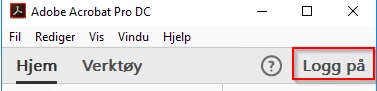
Regards.

This topic has been closed for replies.
Correct answer Steve Cordero

Do you want your users to have access to the Document Cloud Services?  If not, then just disable the Services Integration and the Sign In button should be disabled too. 

1 reply

Steve CorderoCorrect answer
Adobe Employee
January 8, 2018

Do you want your users to have access to the Document Cloud Services?  If not, then just disable the Services Integration and the Sign In button should be disabled too.