
Participant
April 19, 2016
Answered

Editing a Signed Document

  • April 19, 2016
  • 1 reply
  • 4368 views

I just downloaded Acrobat Pro. Everything I have attempted to edit tells me it is already signed and cannot be edited. This is not the case and I want to know if there is any way to edit pdfs I have already created? I have not signed anything because I just downloaded PRO today and that was not a free option.

Does anyone know how to correct this?

Thank you!!
This topic has been closed for replies.
Correct answer Tariq Dar

Hello Mandy,

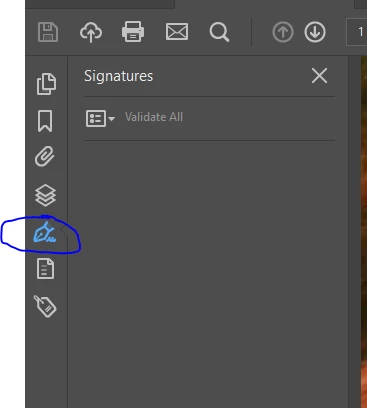
Most likely the document you are trying to edit is a signed document. Click on the left-hand panel

And click on signatures, if the document is signed you won't be able to edit.


To Edit a signed document, you may check this link: How do I edit a signed PDF document (Edit PDF)

Regards,

Tariq Dar.

1 reply

Tariq DarCorrect answer
Legend
May 10, 2016

Hello Mandy,

Most likely the document you are trying to edit is a signed document. Click on the left-hand panel

And click on signatures, if the document is signed you won't be able to edit.


To Edit a signed document, you may check this link: How do I edit a signed PDF document (Edit PDF)

Regards,

Tariq Dar.