
Participant
September 27, 2024
Answered

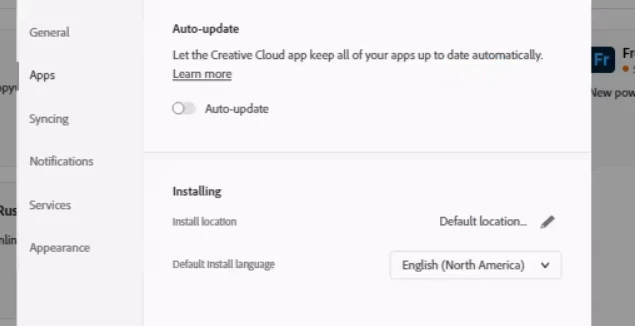
Enable Auto update in Creative Cloud to let the Creative Cloud keep Adobe apps updated automatically

  • September 27, 2024
  • 1 reply
  • 791 views

Hi,


Would anyone one know how to enable auto-update in Creative Cloud to let the Creative Cloud app keep all the Adobe apps updated automatically? Is there a way to enable it via reg key or system file? 


Any help would be much appreciated. Thank you.
 

This topic has been closed for replies.
Correct answer Anshul_Nautiyal

Hi there,


I noticed that there are no active subscriptions listed under the Adobe ID you have used to post your query here. If you're managing Creative Cloud updates as an individual user, please refer to the following article for guidance:  https://adobe.ly/3TMYNhb.


If you're an admin with a Teams or Enterprise subscription, you can find more detailed instructions in this documentation: https://adobe.ly/3TLGEk5.


If you need further assistance please share the correct Adobe ID(email with which this subscription is registered) in a personal message with me. We're here to help! Please refer this article for how to send personal message:https://adobe.ly/3Y0iwN6


Thank you.


^AN

1 reply

Anshul_NautiyalCommunity ManagerCorrect answer
Community Manager
September 27, 2024

Hi there,


I noticed that there are no active subscriptions listed under the Adobe ID you have used to post your query here. If you're managing Creative Cloud updates as an individual user, please refer to the following article for guidance:  https://adobe.ly/3TMYNhb.


If you're an admin with a Teams or Enterprise subscription, you can find more detailed instructions in this documentation: https://adobe.ly/3TLGEk5.


If you need further assistance please share the correct Adobe ID(email with which this subscription is registered) in a personal message with me. We're here to help! Please refer this article for how to send personal message:https://adobe.ly/3Y0iwN6


Thank you.


^AN