
Participant
June 29, 2013
Answered

Enterprise CC Packager Install Fail

  • June 29, 2013
  • 2 replies
  • 845 views

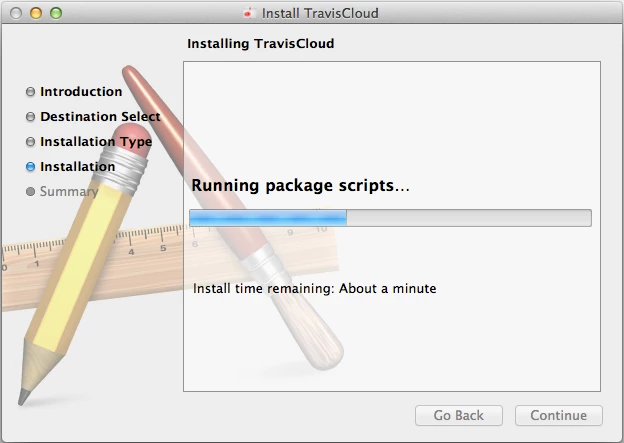
I'm on Macbook Pro running 10.8 w/ 12GB RAM. I created an installer package with everything in the CC as of 6/27/2013. The Package downloaded and is a little over 12 GB. I ran the installation and it hung up and failed after the instal estimation clock ran up to over an hour remaining. After retrying once I begain searching for the issue and found a thread here saying that CC Cleaner would do the trick. I manually uninstalled everything I had Adobe related (CS5.5 and CS6 collections) and then ran CC Cleaner. Same result. I've removed the entire App Support>Adobe folders from my user library and my system library as well. Still get the same result every time. Attached is a picture of where it hangs in the install, it reaches this point within a few seconds and then stays for over 30 minutes as the clock runs up before it fails. I cannot cancel this install without a force quit either.

The definition of insanity is doing the same thing over and over again and expecting different results.

I'm at the point of insanity.
    This topic has been closed for replies.
    Correct answer Travis Paulding

    Success!

    Here are the additional steps I took after doing all of the above:

    1. Ran CC Cleaner again since every failed install left remnants all over.
    2. Removed the files from the HD>Library>Preferences>Adobe folder. These files remained after running uninstallers that were told to remove preference files AND after running the CC Cleaner.
    3. Reboot
    4. Ran Installer

    2 replies

    Travis PauldingAuthorCorrect answer
    Participant
    June 30, 2013

    Success!

    Here are the additional steps I took after doing all of the above:

    1. Ran CC Cleaner again since every failed install left remnants all over.
    2. Removed the files from the HD>Library>Preferences>Adobe folder. These files remained after running uninstallers that were told to remove preference files AND after running the CC Cleaner.
    3. Reboot
    4. Ran Installer
    Preran
    Legend
    July 2, 2013

    Hi Travis,

    Thank you for sharing your solution with our users who might have a similar problem. Much appreciated.

    Thanks,

    Preran

    Participant
    June 30, 2013

    Continued troubleshooting:

    I ran the installer on a new user account with admin privs and it still failed.

    I transferred the same installer package to my iMac (also OS 10.8.4) and it succeeded. That was without uninstalling CS6 or CS5.5 versions and also without running the CC Cleaner.

    It appears to be something on the system level of my Macbook Pro.