
November 17, 2017
Answered

Error when opening PDFs in IE after installing Acrobat DC Pro

  • November 17, 2017
  • 1 reply
  • 1459 views

All users in our organisation have Adobe Reader DC installed by default. A number of users are additionally being given Adobe Acrobat Pro DC.

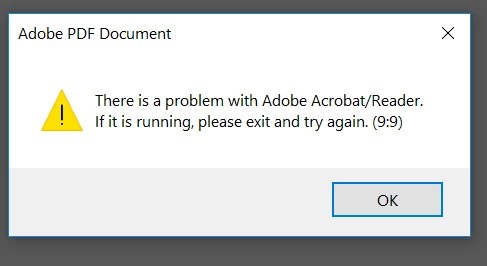
After we deploy Pro DC to the users' machines, when they try and open PDFs in the browser (IE) they receive a message as per the below - "There is a problem with Adobe Acrobat/Reader. If it is running, please exit and try again. (9:9)
For some users if we repair Reader through programs and features after both have been installed it seems to fix it. I am assuming this is just some registry keys or similar that need to be changed to resolve it, is there any way to know which so we can include this as part of the deployment?

We used to be able to run both simultaneously with no issues.

Appreciate any suggestions.

This topic has been closed for replies.
Correct answer soumik011

Hi Avery,

You can use the following command to trigger repair:-

> msiexec /fa {GUID}

For silent install:-

>msiexec /fa {GUID} /qn

Example - msiexec /fa {AC76BA86-7AD7-1033-7B44-AC0F074E4100} /qn

You can get the GUID for the product from the following registry location:-

[HKEY_LOCAL_MACHINE\SOFTWARE\WOW6432Node\Adobe\Acrobat Reader\DC\Installer]

"ENU_GUID"="{AC76BA86-7AD7-1033-7B44-AC0F074E4100}"

Please make sure its ran in the test environment before moving it to the PROD.

Regards

Soumik

1 reply

soumik011
Adobe Employee
Adobe Employee
November 21, 2017

Hi averydc

We have seen this issue coming when there is compatibility issue between the IE plugin and product. Since both Reader and Acrobat DC Pro carry its own set of plugin DLLs, installing both the products may throw up this error.

To fix this first confirm which one is your default app for viewing PDF. Then 'repair' that particular product from 'programs and features' and then try to open any PDF in IE.

Also verify whether both the products have the same version?

Regards

Soumik

November 28, 2017

Thanks for that Soumik.

Is there a way we can automate the repair, or can you tell me which registry keys the repair changes so we can script this as part of the deployment of Acrobat Pro?

Having to repair Acrobat Reader manually for every used is not feasible for the size of our organisation.

Regards

Avery

soumik011
Adobe Employee
soumik011Correct answer
Adobe Employee
November 29, 2017

Hi Avery,

You can use the following command to trigger repair:-

> msiexec /fa {GUID}

For silent install:-

>msiexec /fa {GUID} /qn

Example - msiexec /fa {AC76BA86-7AD7-1033-7B44-AC0F074E4100} /qn

You can get the GUID for the product from the following registry location:-

[HKEY_LOCAL_MACHINE\SOFTWARE\WOW6432Node\Adobe\Acrobat Reader\DC\Installer]

"ENU_GUID"="{AC76BA86-7AD7-1033-7B44-AC0F074E4100}"

Please make sure its ran in the test environment before moving it to the PROD.

Regards

Soumik