Participant
January 4, 2018
Answered

Failed install with Creative Cloud Packager

  • January 4, 2018
  • 1 reply
  • 1183 views

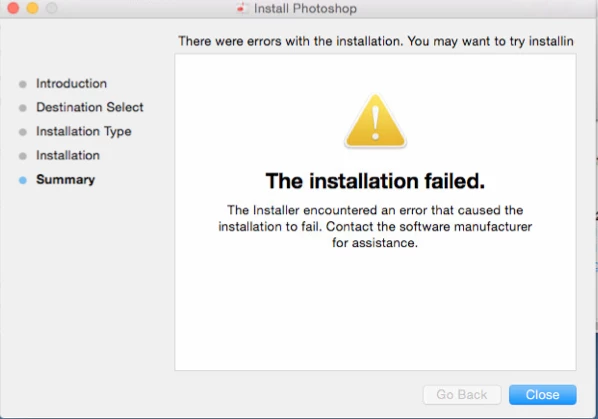
I'm trying to install Creative Cloud through the Packager. When I run the installer after it's downloaded, I get this message:

I've tried ways to fix this that have been mentioned on this forum before; like clearing out the Packager cache, uninstalling Creative Cloud, and running the Cleanup Tool.

None of these solutions seem to work.

This topic has been closed for replies.
Correct answer alisterblack

Check the system requirements to see if your hardware, disk space etc is ok. The OS is fine. Photoshop system requirements

By deployment method I was really wanting to know if you were using a tool such as Caspar or SCCM, installing via the terminal and command line or just double clicking locally. Try installing via the terminal with elevated privileges using sudo. See Creative Cloud Help | How to install a package created with Creative Cloud Packager

If your problems persist I would gather all the log files using the log collector tool and contact support.

To contact support please use one of the following options.

Creative Cloud for Enterprise - from the Admin Console go to the support tab to open a case. Phone and chat options are also available here.

Creative Cloud for Teams - from the CCT Admin Console go to the Help tab for chat and phone options.

Alternatively please https://helpx.adobe.com/contact.html

1 reply

alisterblack
Inspiring
January 4, 2018

Hi,

You description indicates that this is a new package you are deploying. However if this is an older package please see this document.

Can you let us know

  • What is in the package
  • What platform you are deploying to.
  • What method you are using to deploy.
Participant
January 5, 2018

It's a brand new package I've created - the contents of the package were as follows:

This package contains following products

Photoshop CC (19.0)

This package contains following updates

Adobe Application Manager (update14)

Camera Raw CC (10.0) (Full installer)

STI_ColorCommonSet_RGB_HD (1.1) (Full installer)

However, I've made packages with different software - like Illustrator, InDesign, Premiere Pro - and they've all had the same installation error.

It's being deployed on OSX Yosemite, and the method I'm using is Creative Cloud for teams, with a device license and Creative Cloud desktop application selected. (the iMac I'm installing to has had a license package installed as well)

alisterblack
alisterblackCorrect answer
Inspiring
January 5, 2018

Check the system requirements to see if your hardware, disk space etc is ok. The OS is fine. Photoshop system requirements

By deployment method I was really wanting to know if you were using a tool such as Caspar or SCCM, installing via the terminal and command line or just double clicking locally. Try installing via the terminal with elevated privileges using sudo. See Creative Cloud Help | How to install a package created with Creative Cloud Packager

If your problems persist I would gather all the log files using the log collector tool and contact support.

To contact support please use one of the following options.

Creative Cloud for Enterprise - from the Admin Console go to the support tab to open a case. Phone and chat options are also available here.

Creative Cloud for Teams - from the CCT Admin Console go to the Help tab for chat and phone options.

Alternatively please https://helpx.adobe.com/contact.html