
Participant
January 11, 2023
Question

Federated ID account has the wrong username

  • January 11, 2023
  • 2 replies
  • 683 views

One of our students has the wrong username when she was imported into the Adobe Admin console. When she logs in it just gives her an error. (Error says something like the error is on the Adobe side).


Is there a way to delete the user completely and reimport her so her credentials are correct or edit the username? There is no option to edit the user details, (the three dots are missing).
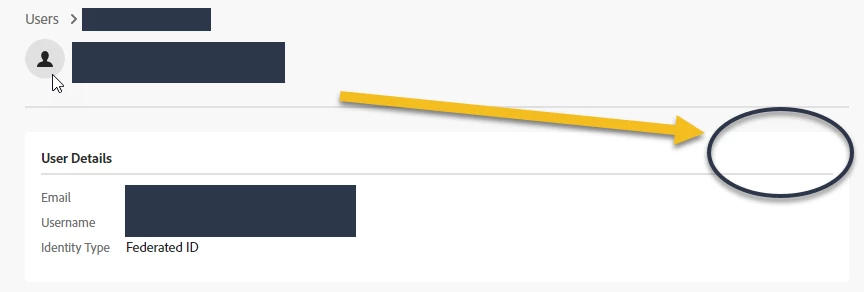


This topic has been closed for replies.

2 replies

Ashish_Harrison
Adobe Employee
Adobe Employee
January 11, 2023

Hi @sc4photog if you're using Sync (Google/Azure) please go to Directory > Sync and Enable Editing, this feature will help you in editing the user details via CSV, or if you wish you can completely delete the user from users and directory users tab.
Note: Deleting the user from the Directory users tab will permanently delete the user's data(if any, stored on Adobe cloud) and cannot be recovered.

Regards,Ashish Harrison
Abambo
Community Expert
Community Expert
January 12, 2023
quote

Note: Deleting the user from the Directory users tab will permanently delete the user's data(if any, stored on Adobe cloud) and cannot be recovered.


By @Ashish_Harrison

But for a user who has not yet accessed the system, it may be the easiest solution. Delete/recreate.

ABAMBO | Hard- and Software Engineer | Photographer
Ashish_Harrison
Adobe Employee
Adobe Employee
January 12, 2023

@Abambo Absolutely correct, as it's an open forum so I want IT admins to be aware of this.

Regards,Ashish Harrison
kglad
Community Expert
Community Expert
January 11, 2023

start here - https://helpx.adobe.com/au/enterprise/using/manage-users-individually.html


if that's no help, open the support tab on your admin console > start chat or start case or request expert session.


https://helpx.adobe.com/enterprise/using/support-and-expert-services.html