Hi @RR-179,
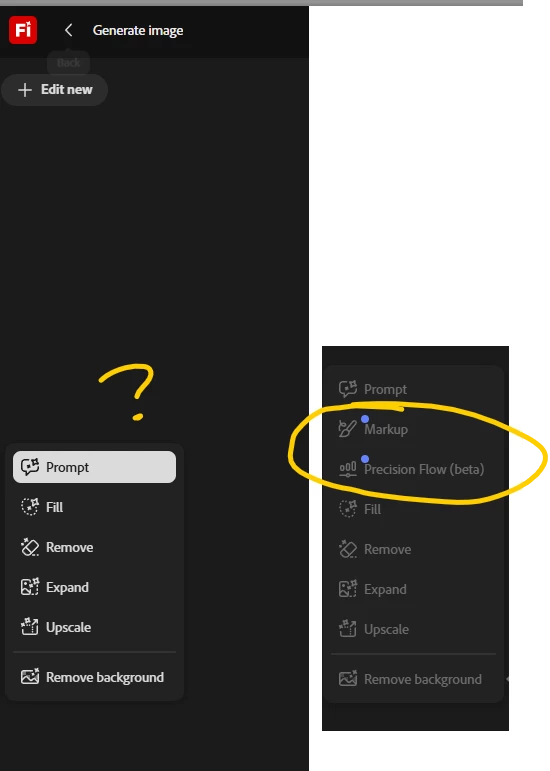
Thank you for reaching out, and we understand how frustrating it must be to see Precision Flow (beta) and AI Markup appear in the Firefly editor only to vanish once you sign in.
Both features are part of the Firefly image editor on https://adobe.ly/4abFypH, accessible from the left toolbar of the Edit tab once an image is generated or uploaded. For Enterprise organizations, however, access to Firefly generative AI features (including these editing tools) is managed through user roles in the Adobe Admin Console. If those roles haven't been configured to include Firefly access, the features will not appear for the signed-in user.
Your System Administrator would be best placed to check this from Admin Console > Users > Roles. There are two predefined roles worth reviewing here:
-
The Member role is assigned to everyone in the organization by default. It includes a setting for accessing Firefly and partner generative AI models, which can be toggled on or off by opening the role and selecting Quick view > Edit.
-
The Firefly user role grants access to commercially safe Adobe Firefly generative AI models. This is helpful when you want to provide access to specific users without changing the org-wide Member role setting.
Role changes apply immediately, though signing out and back in to https://adobe.ly/4abFypH afterward is generally a good idea to ensure the session picks up the new permissions.
For a full reference, your admin may find helpful: https://adobe.ly/4f484Ns
Also, when you're signed in to https://adobe.ly/4abFypH, are other Firefly capabilities working as expected for you (such as Text to Image generation, Generative Fill, or Generative Remove), or are those unavailable to you?
Please share the above, and we'll take it from there.
Thanks,
^BS




 AdChoices