janv629695
Participant
September 23, 2018
Answered

Got EN installers through company license. How to add another language?

  • September 23, 2018
  • 6 replies
  • 596 views

Hi,

My employer allows us to use the complete CC suite (except for the cloud) on our home pc. We can use our company pc and email to download installers.

Photoshop for example is a zip (Photoshop_CC_EN_64) that contains (among a few other things) a msi with the same name and a setup.exe

Once installed, the app is EN only.

I installed the CC local app (from the public website) but that does not seem to find the local Photoshop app. And even then, the idea seems to be that you remove the EN app and re-install it in the new language.

How can I change the language of the EN app I now have? Thanks!

This topic has been closed for replies.
Correct answer alisterblack

The latter. And since the only supply us with the EN versions, we don't seem to have a way to get the UI to display in another language.

Thanks!


Hi,

After you have installed do you sign in with an Adobe ID?

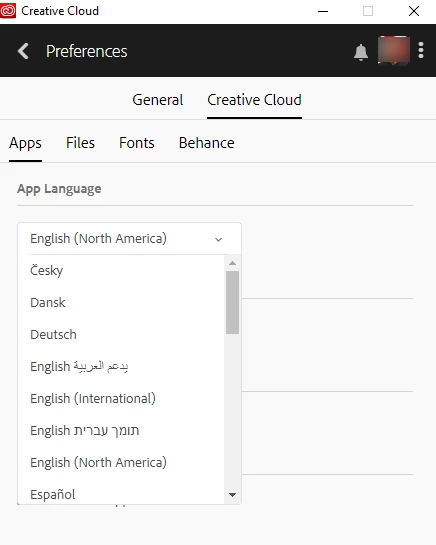
If so you can use the Creative Cloud Desktop App and easily change the language via the desktop app preferences.

Change the language setting of your Creative Cloud apps

If the application has been deployed with a serial number then it is not so straightforward and you should request that your IT team deliver a package in the appropriate language. They can choose this when packaging the application - they also have a choice to match the OS language.

6 replies

kglad
Community Expert
Community Expert
September 23, 2018

uninstall your current app that's using an incorrect language.

then follow these instructions to install with the correct language: https://helpx.adobe.com/creative-cloud/kb/change-installed-language.html

janv629695
Participant
September 23, 2018

I know, but the apps are not listed in my CC profile, since I got the EN installers through my employer.

kglad
Community Expert
Community Expert
September 23, 2018

what's a "cc profile"?

are the apps listed in your cc desktop app from here, install the cc desktop app from here https://creative.adobe.com/products/creative-cloud and use it to install your adobe subscription and trial programs.

or are you supposed to use some other mechanism to install your programs because they are enterprise versions and not individual user versions?