
January 2, 2026
Answered

HELP: No plans activated but still get charged

  • January 2, 2026
  • 1 reply
  • 74 views

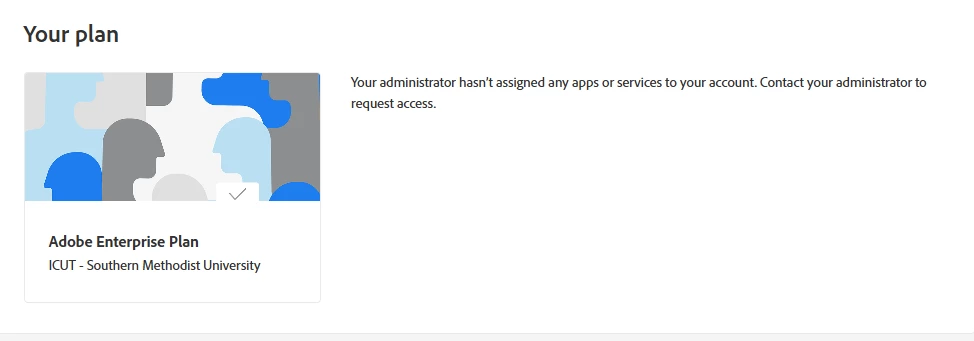
I have this account as under my school's name and I just got charged for an enterprise plan that I do not know where to cancel. In my plan tab there is no active plan showed up and I have no access to any apps. But I still got charged for a monthly bill. How can I stop it and get refund back? 
haonan_8428_0-1767393131434.png


Correct answer Anshul_Nautiyal

Hi @haonan_8428,

Thank you for reaching out.

After reviewing your account, we can see that you currently have an active Teams plan associated with the Adobe ID (email) used to submit this query.

If you would like to cancel the Teams subscription, please sign in to the Admin Console and follow the steps outlined in the following guide:
https://adobe.ly/4sr2EAm

If you do not see the option to cancel, please note that this functionality is being rolled out gradually and may not yet be available on your account. In that case, you can go to the Support tab in the Admin Console and select Start chat to contact Adobe Customer Care for assistance.

Please let us know if you need any further help.


Regards,
^AN

1 reply

Anshul_NautiyalCommunity ManagerCorrect answer
Community Manager
January 5, 2026

Hi @haonan_8428,

Thank you for reaching out.

After reviewing your account, we can see that you currently have an active Teams plan associated with the Adobe ID (email) used to submit this query.

If you would like to cancel the Teams subscription, please sign in to the Admin Console and follow the steps outlined in the following guide:
https://adobe.ly/4sr2EAm

If you do not see the option to cancel, please note that this functionality is being rolled out gradually and may not yet be available on your account. In that case, you can go to the Support tab in the Admin Console and select Start chat to contact Adobe Customer Care for assistance.

Please let us know if you need any further help.


Regards,
^AN