Participant
Jan 29, 2022 12:43 AM UTC
Answered

How do I delete my entire team?

I'd like to delete my team, but none of the settings help. No setting is avaliable either, so how do I delete my entire team?

This topic is closed to new replies. Start a new post to keep the conversation going.
Abambo
AbamboCorrect answer
Community Expert
Jan 29, 2022 10:11 AM UTC

Do you want to delete your teams account? Like stopping the subscription and forgetting about it?


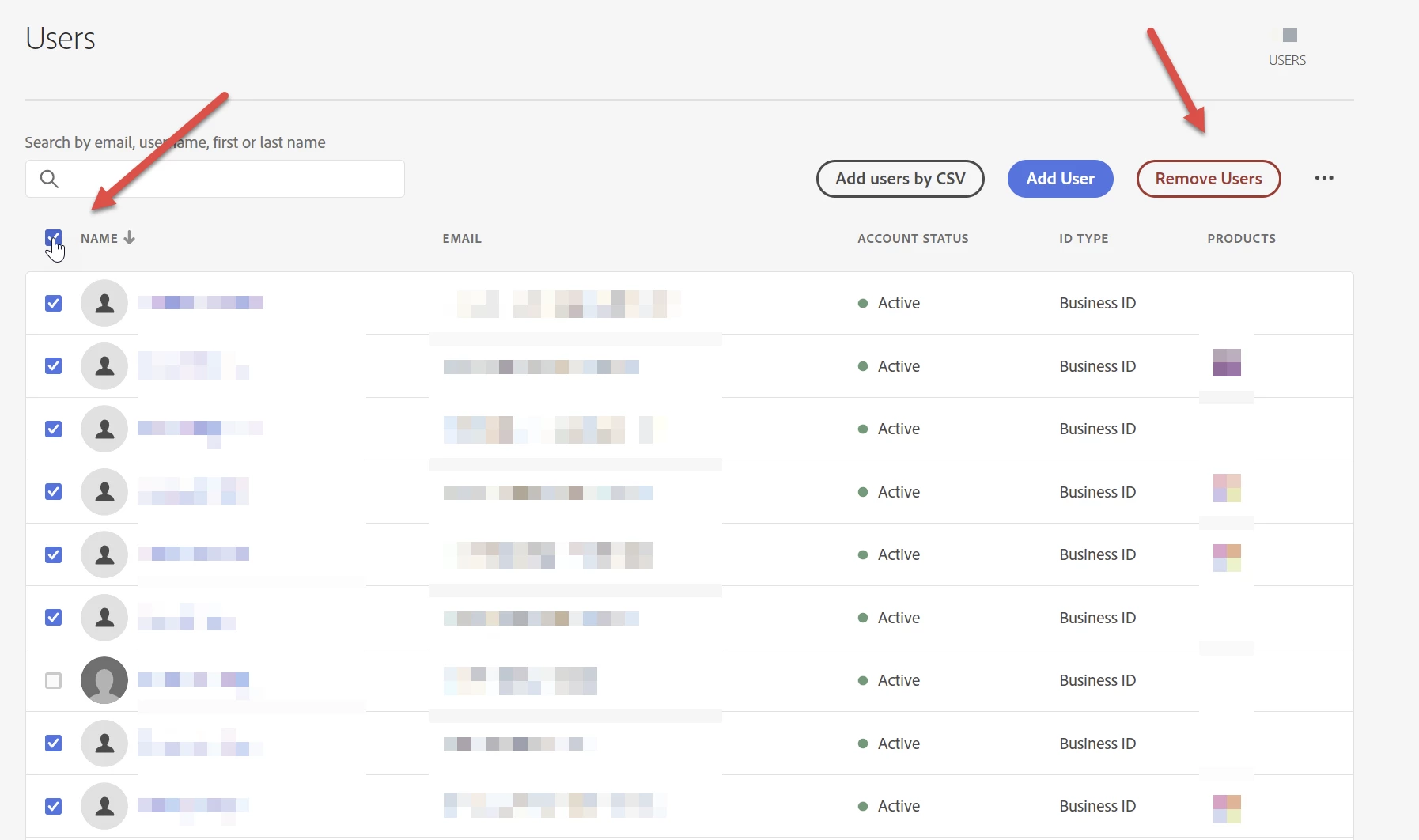
Or do you want to remove all members of your teams account and reduce the subscription and/or attribute the products to new team members?


Go to the admin console, Users:

You can't, however, remove the contract owner.

ABAMBO | Hard- and Software Engineer | Photographer

1 reply

Abambo
Community Expert
AbamboCommunity ExpertCorrect answer
Community Expert
Jan 29, 2022 10:11 AM UTC

Do you want to delete your teams account? Like stopping the subscription and forgetting about it?


Or do you want to remove all members of your teams account and reduce the subscription and/or attribute the products to new team members?


Go to the admin console, Users:

You can't, however, remove the contract owner.

Translate
ABAMBO | Hard- and Software Engineer | Photographer