


Participating Frequently
January 3, 2019
Answered

How do I register multiple copies of Acrobat Pro 2017 in an office environment?

  • January 3, 2019
  • 2 replies
  • 4039 views

We recently purchased a volume license for Adobe Acrobat 2017. I used my own Adobe ID to log in/download software/retrieve a license, which was no big deal. I noticed I had to use my Adobe ID to register the software after installation.

My question is, do I have to get every user that will be installing this software a unique Adobe ID to register the software on their machines after I install it? I doubt they will want to see my name in the upper right corner of the software if I register everyone's software with my Adobe ID.

This topic has been closed for replies.
Correct answer EnterpriseHelp

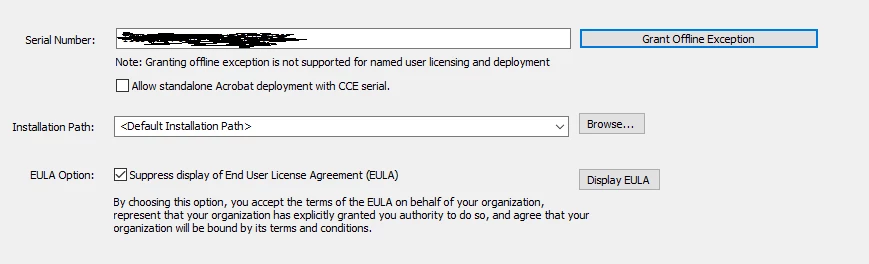
Actually when I check the box "Grant Offline Exception"

the SN field is greyed out. I save the MSI and close the Wizard. I open/run the  AcroPro.msi that I've previously worked on in the Wizard and the installation opens. I enter the license key on the screen where it asks for one or choose the "trial" version. I don't do anything fancy to open the MSI other than use a File Explorer and browse to it and run it. Then I go through the standard installation.

Upon running the program for the first time after installation, is when I'm presented with the "Sign In Required" screen.


By "greyed out" do you mean the user interface has disabled it and you can't interact with the field, or do you mean you crossed it out in the screenshot?

Wizard usage does not modify the MSI. It creates an MST file that you reference from the cmd line (or which is referenced automatically in the Setup.ini file when you run Setup.exe).

Verify:

  • You've entered the license in the Wizard.
  • You've saved the project.
  • There's an MST in the same dir with a current date.
  • Open the ini file and verify it references the MST.
  • Run Setup.exe.

If you still have problems, it's time to look at logs.

2 replies

PadokeAuthor
Participating Frequently
January 3, 2019

Yes, I have 1 license to activate all copies of the software. The version is Acrobat Pro 2017 and it’s English for the US.

I have had no problems getting the software licensed for installation purposes. It’s just the product registration/first-time run of the software that is creating some questions on how to get it registered.

EnterpriseHelp
Community Manager
Community Manager
January 3, 2019

Admins usually register for all users pre-deployment via the Wizard, cmd properties, etc.

Common Deployment Options — Enterprise Administration Guide

PadokeAuthor
Participating Frequently
January 3, 2019

Thanks for the information. I have the wizard and I have opened my msi for tweaking. I see an option for suppressing the EULA in the Personalization Options but I cannot find the option that suppresses the registration. I've looked at the admin guide you referred me to and I guess I'm just not sure where the option/trigger is for suppressing the the registration.

Any other help is greatly appreciated.

kglad
Community Expert
Community Expert
January 3, 2019