Participant
July 6, 2015
Answered

how do we resend a invitation for a team member?

  • July 6, 2015
  • 10 replies
  • 41030 views

We had to build a new computer for a team member.

how do we resend a invitation for a team member?

    Correct answer Vikrant R

    The concept of invitations has gone away. So nothing to accept and it doesn't expire anymore. User can just sign-in with an account that has the email address that was added and begin using their apps and services.
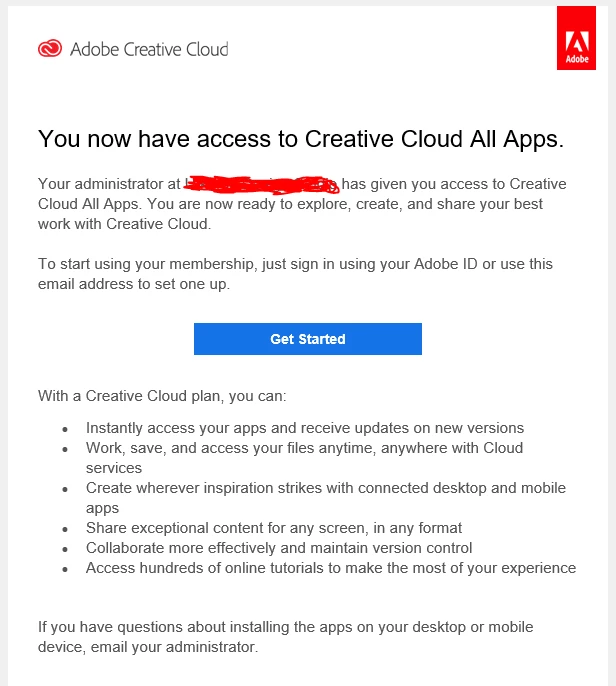


    For more information, on how to add users to your team, see https://helpx.adobe.com/enterprise/using/assign-seats-teams.html

    10 replies

    joliblanks
    Participant
    February 4, 2020

    We need to notify our new users of their licenses and send them a link to click when they are issued new machines. The invitation used to do that. Now the burden of notification and providing instructions for installation and login falls on me? This change makes my job more difficult, and I don't like paying more for decreased efficiency. Guess i will take the lesser of the less efficient options and remove and re-add users like everyone else. 😞

    patrickc556318
    Participant
    June 27, 2019

    Why didn't the staff response ever just put the web address in any of his responses? Remember that class where you have to describe how to make a peanut butter and jelly sandwich and then someone exactly follows your directions? What a fun mess that was. Please assume we don't know the jar has to be opened and we don't have a butter knife. Please add more information to the responses.

    barryb39734237
    Participant
    August 13, 2019

    Was this issue ever resolved short of deleting the user and re-enabling them?

    Such a total pain in the backside...

    Participant
    August 15, 2019

    As far as I can tell, no change to the admin portal to resend the invite link.  I had to recently (today) disengage a user and re-provision him and he did see a fresh invite.  I agree, the resend link option should have been left alone...sigh

    Participant
    June 26, 2019

    I must agree as a company Helpdesk admin, that it is much easier for the user to simply click on an email link and get started. Adobe is saying "but you don't need to do that, the user already has rights." What Adobe does not seem to be getting here is that it is easier for the admin and the user to use the invitation method. This should be about making things easier for the customer. Where does a user go that has a fresh PC? Lets see...Google Adobe CC login....find many results....maybe this one will work. Will the login even work..... etc..., etc...

    People just want things SIMPLE.....We have work to do.  Resend link...user click...DONE. 

    PS- I do love the new admin panel Adobe...Kudos on that. At least you didn't say...We don't need a new admin panel all your licenses are still there even if you cannot find them or organize them.....You don't need a new admin panel...the licenses are already there.

    Participant
    November 30, 2018

    When did that start?  I had a user receive an email just a month ago.

    The user doesn't not want to launch their browser that way.

    Can I remove the user and then add them back?

    alisterblack
    Inspiring
    November 30, 2018

    Hi,

    Users can still get notifications when added to a product profile (although you can turn that off for Enterprise accounts).

    Yes, you can remove the user and add them back in.

    micaelah30014378
    Participant
    October 29, 2018

    Has this been addressed? There used to be a very clear and simple way to resend an invite, not sure when the change occurred but the whole portal is redundant and frustrating now. Also being told i "don't need to resend an invite" by a customer support rep is unsettling, since i've had to resend about a hundred invites due to users forgetting to setup their adobe when it is first assigned or neglecting to use the search function in their outlook.

    alisterblack
    Inspiring
    October 30, 2018

    Hi,

    We don't have the concept of invitations or expiry anymore. Admins can simply add the user and entitle them.  The end users will receive welcome emails for the software to which they've been entitled and can then get started.  In case the email address of the user is not registered to adobe.com then the user will be prompted to complete their profile and create their password. They can do this at a later stage - by logging in with their Adobe ID to the Desktop App or Adobe.com they can click the forgot password prompt.

    If you are using Enterprise ID or Federated ID then there are differences. The admin can send a password reset for the user for Enterprise ID. Federated ID uses the directory password (e.g. LDAP). The user themselves can reset their Adobe ID password.

    Send password reset email for an Enterprise ID user

    Learn how to reset a forgotten password or change your existing password.

    Participant
    November 5, 2018

    My end user on my team can not find the email adobe sent her to join. How do I resend?

    Participant
    October 29, 2018

    Hello Adobe. You seem to be missing the questions below the original post. Can you please tell us how to resend an invitation to a new member in the case that the user did not accept it in time and it has now expired? Your new admin portal has removed the "resend invitation" button. Are we supposed to delete the account and re-create it to do this now?

    Vikrant R
    Vikrant RCorrect answer
    Inspiring
    December 3, 2019

    The concept of invitations has gone away. So nothing to accept and it doesn't expire anymore. User can just sign-in with an account that has the email address that was added and begin using their apps and services.


    For more information, on how to add users to your team, see https://helpx.adobe.com/enterprise/using/assign-seats-teams.html

    Tom_Alongi
    Known Participant
    October 4, 2020

    This does not work. I'm trying to sign up a legal assistant on a new computer, using the CC license already assigned to them. When I try to "just sign in," I get an error message. It doesn't even recognize the email address, even though I compared to make sure it was typed correctly.

    donk16404990
    Participant
    October 2, 2018

    I'm having the same issue. Adobe, please put a resend button in your admin portal!

    alisterblack
    Inspiring
    October 4, 2018

    Hi,

    Please confirm what types of license you have. The original question referred to Creative Cloud for Teams - which is a named user only process, so the end user is given entitlement to use the product by the admin on the admin console and then they sign in to the product to pick up that entitlement.

    If your user already has entitlement to use the product - which you can see on your admin console - then you do not need to re-invite. They just need to sign in with their Adobe ID.

    If they don't then you need to add them to your console and give them entitlement.

    If you are using device licenses/serial numbers or something else then please let us know and we will advise accordingly.

    henr12605778
    Participant
    June 6, 2018

    Dear Adobe Support, thank you for taking what was an incredibly easy, simple process and needlessly complicating it for both the administrator and end user! 

    bobs85008685
    Participating Frequently
    September 18, 2018

    I still can't find how to resend an invite. I ended up just deleting the user and starting over.

    Participant
    January 6, 2022

    Because you can't resend invites. You still can't. Hundreds of complaints about this, for years, they don't care.

    Pattie-F
    Legend
    July 6, 2015
    Sheena Kaul
    Legend
    July 6, 2015

    Hi Jim,

    If the team member already has an active license on the team, you need not re-invite him.

    Please refer to the help documents below to download the Adobe CC desktop app:

    Creative Cloud for desktop

    Download, install, update, or uninstall apps


    In case the member did not have an active license, please refer to the help document below:

    Manage your Creative Cloud for teams membership


    Regards,

    Sheena