


Participant
Sep 24, 2019 7:27 PM UTC
Question

How to Authenticate and create users using LDAP ?

How do I configure LDAP on ADOBE so that users can be authenticated using LDAP , 

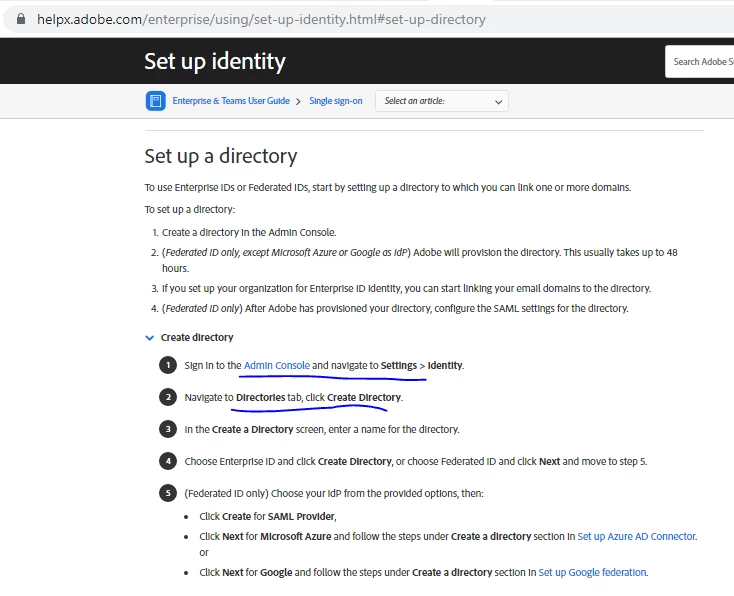
In the procedure given I seem not to get the steps on the Admin console .

Our account is an Enterprise account.
 

This topic is closed to new replies. Start a new post to keep the conversation going.

4 replies

Vikrant R
Inspiring
Sep 25, 2019 2:09 PM UTC

If these steps are not avalable on the Admin Console, you probbaly have a Creative Cloud for teams account. Creative Cloud for teams do not support Enterprise IDs or SSO/Federated IDs, hence these settings are probably unavailable.


Coud you confirm what product you have? One quick way to check, would be to check the Accounts tab. If it has your account details, then you have a teams account.


Translate
gkagoAuthor
Participant
Sep 25, 2019 3:59 PM UTC
our account is enterprise account
Translate
Vikrant R
Inspiring
Sep 26, 2019 9:44 AM UTC
Thanks! The next thing would be to check for your Admin Role. System Admins are able to add and modify the Identity settings. It could be that you don't have System Admin privileges. See https://helpx.adobe.com/enterprise/using/admin-roles.html
Translate
Sonam Monga
Legend
Sep 25, 2019 6:33 AM UTC

Hi gkago,

For users in your organization to be able to use their corporate credentials to access Adobe software, you will need to configure and enable Single Sign-On (SSO). This enables users to use a single credential to access Adobe desktop apps, services, and mobile apps.

Start with creating a directory selecting Federated ID authentication, and then configure SSO for the directory.

Translate