stevet95466836
Participant
April 4, 2018
Answered

How to automatically accept EULA using SCCM deployment

  • April 4, 2018
  • 1 reply
  • 9035 views

I am trying to deploy Adobe Reader XI to our Windows 10 computers using SCCM 2016. I am using the following command in my package

"AcroRdrDC1801120035_en_US.exe" EULA_ACCEPT=YES /qn and while the deployment works and installs Reader, the EULA acceptance doesn't. While

it's only a minor inconvenience, we don't want our users to have to accept the agreement, especially if there is a way to automatically accept it. Can someone please

help me? thanks

This topic has been closed for replies.
Correct answer Meenakshi_Negi

Hi Stevet,

As you are trying to suppress the EULA acceptance for the users, I would suggest you that to try it using the MSI file instead of EXE.

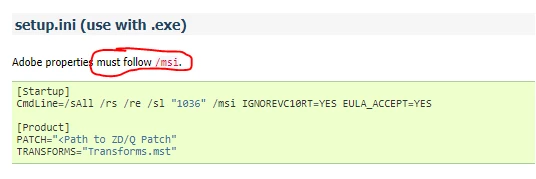
Please check the screenshot below:

Also, check this link: PDF Viewer Settings

Check if that helps.

It is recommended to use the Acrobat Customization Wizard DC to customize the package for deployment.

You may check and download it from here Welcome to the Wizard — Acrobat Customization Wizard DC for Windows

Let us know if you have any questions.

Regards,

Meenakshi

1 reply

Meenakshi_Negi
Meenakshi_NegiCorrect answer
Legend
April 5, 2018

Hi Stevet,

As you are trying to suppress the EULA acceptance for the users, I would suggest you that to try it using the MSI file instead of EXE.

Please check the screenshot below:

Also, check this link: PDF Viewer Settings

Check if that helps.

It is recommended to use the Acrobat Customization Wizard DC to customize the package for deployment.

You may check and download it from here Welcome to the Wizard — Acrobat Customization Wizard DC for Windows

Let us know if you have any questions.

Regards,

Meenakshi