This topic is closed to new replies. Start a new post to keep the conversation going.
SuJoshiCorrect answer
Community Manager
Jul 2, 2023 3:53 AM UTC

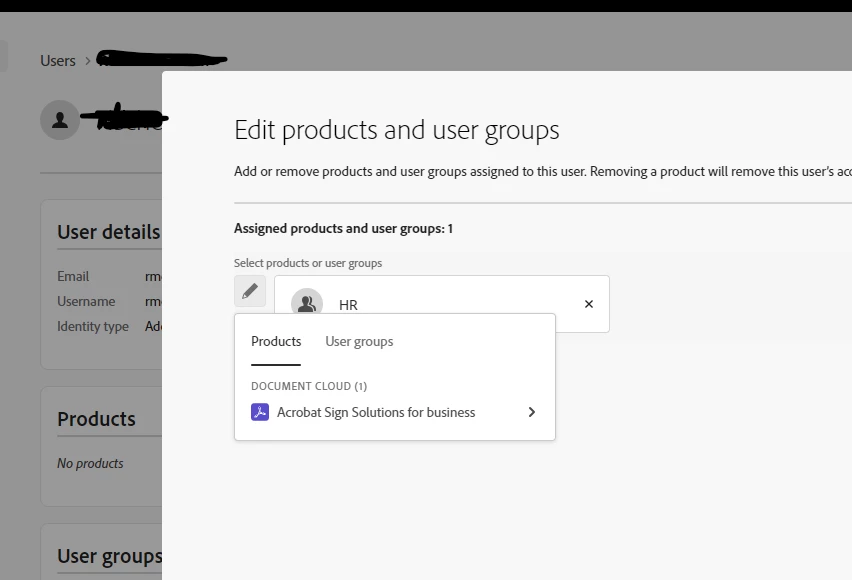
@Nan Buske As per our record, you purchased two Adobe Sign licenses already assigned to the users. The rest are showing under the No Access list. You can check the list by selecting the product profile of the Adobe Sign license.

I request you contact your Reseller and check how many licenses are renewed or added to your contract.

6 replies

Community Manager
Jul 1, 2023 8:11 AM UTC

@Nan Buske, Please confirm if you are getting any errors while saving the changes.

Translate
Nan BuskeAuthor
Participant
Jul 1, 2023 7:07 PM UTC
I can click save but the page returns as the previous stage as no product for user.


Nan Buske (she, her)

Evident Change, Benefits & HR Analytics Specialist

426 S. Yellowstone Dr.

Madison, WI 53719

(800) 306-6223, ext. 8699<>
Translate
SuJoshiCommunity ManagerCorrect answer
Community Manager
Jul 2, 2023 3:53 AM UTC

@Nan Buske As per our record, you purchased two Adobe Sign licenses already assigned to the users. The rest are showing under the No Access list. You can check the list by selecting the product profile of the Adobe Sign license.

I request you contact your Reseller and check how many licenses are renewed or added to your contract.

Translate
kglad
Community Expert
Community Expert
Jul 1, 2023 12:30 AM UTC

open the support tab on your admin console > start chat or start case or request expert session. https://helpx.adobe.com/enterprise/using/support-and-expert-services.html

Translate
Nan BuskeAuthor
Participant
Jul 1, 2023 7:13 PM UTC
Last case, I wasted 2 weeks explain my problem that they didn’t read. I assume they went with the scripted solution rather than trying to understand my problem. So this time I want to try if community has the same problem and how it gets resolved. Thanks anyway!

Sent from Mail<> for Windows
Translate