


Participant
March 31, 2017
Question

I want Internet Explorer to use Reader instead of Acrobat DC to view pdf's in the browser with both programs installed.

  • March 31, 2017
  • 1 reply
  • 7648 views

I have a very specific problem. I use a invoice program at work that requires silverlight. Silverlight is only compatible with Internet Explorer.

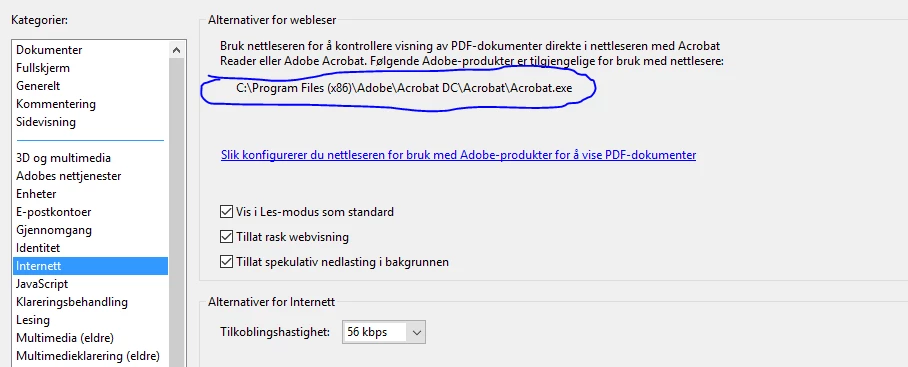
The program shows pdfs in the browser and for some reason it does not work well with Adobe Acrobat DC but work fine with Adobe Reader. I have both applications installed on my computer and it seems impossible to have Internet Explorer use Reader as the standard viewer when Acrobat DC also is installed. When I open the internet settings in Reader, it even points to Acrobat DC. (see picture). I've tried changing the standard program to Reader but it does not help. I've tried disabling the Adobe PDF Reader addon in IE, but that opens the pdf outside of the browser which is not a solution that works. I need Acrobat DC so uninstalling it is not an option.

Is there a file or registry entry that can be changed to have the Adobe PDF reader addon in Internet Explorer use Adobe Reader instead of Adobe Acrobat DC?
This topic has been closed for replies.

1 reply

Community Manager
April 3, 2017

Hi christofferl99732603,

Assuming you are using Windows 10, you may use this link Associate PDF files to always open in Acrobat or Reader on Windows 10  to set Reader as default pdf handler.

Internet explorer uses the dll of the default pdf handler. Let me know if that helps.

If it doesn't, let us know the operating system you are using. And what happens when you set Reader as default pdf handler?

-Tariq Dar.

Participant
April 4, 2017

Hi Tariq.

Thank you for replying.

The default pdf handler is already set to Reader. The problem is that when installing Acrobat after Reader Internet Explorer will use Acrobat to view pdf's (in browser) regardless of what you set as windows default. I did som experimenting and found out that the active x controller always uses the last installed software to open pdfs in browser (again regardless of what you set as windows standard). So by reinstalling Reader after Acrobat it actually solved the problem. Now the default pdf-handler is Acrobat and web applications in IE uses Reader to show the pdf (in browser) which is exactly what I need.

-Chris

Community Manager
April 5, 2017

Hi Chris,

I am glad that you were able to find the cause and resolve your issue. And I really appreciate responding with your findings.

Would you please help me with the operating system name and version you are using?

-Tariq Dar.