
Participating Frequently
June 18, 2015
Answered

InDesign/InCopy package created by CCP prompting for (disabled) CC application

  • June 18, 2015
  • 5 replies
  • 2014 views

We are creating installation packages for the new Creative Cloud 2015 release, for use by our higher-education faculty and staff. We have the appropriate volume license; an ETLA, I believe. We use Creative Cloud Packager (CCP) to produce Mac OS X installer packages, which we then distribute using a software management solution, like JAMF Casper. We build one package for each application (Photoshop.pkg, FlashPro.pkg, PremierePro.pkg, etc.), and three "bundles" that roughly resembled the CS6 bundles - Master Collection.pkg, Design and Web Premium.pkg, and Production Premium.pkg. When creating the package, we disable the Creative Cloud application and the use of Adobe Update Manager to manage updates. We use RemoteUpdateManager behind the scenes to update the software. AdobeID's created by our faculty and staff are not associated with our volume license, so the Creative Cloud application is of little use, since (to the best of my knowledge, at least) the application requires a Creative Cloud subscription in order to run.

With the new release, any Mac OS X package we build that contains InDesign or InCopy 2015, and installed on a Mac OS X 10.10.x system (I will be testing on 10.9.x tonight and tomorrow) will display the following error message:
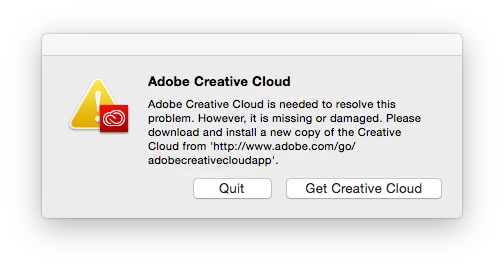
"Adobe Creative Cloud is need to resolve this problem. However, it is missing or damaged. Please download and install a new copy of the Creative Cloud from 'http://www.adobe.com/go/adobecreativecloudapp'."

The package was rebuilt from scratch in CCP to make sure the Creative Cloud application was disabled; when this new package was installed, the system restarted, and either application started, the application still prompted for installation of the Creative Cloud app. The prompt would not be displayed if InDesign or InCopy is quit and is started again during the same login session. However, the first time either application is started after restarting, the Adobe Creative Cloud missing prompt is redisplayed. Other applications start normally without displaying the prompt.

No other package that we've built for the Creative Cloud 2015 releases exhibits this behavior.

Packages built for the original and 2014 Creative Cloud releases do not exhibit this behavior.

Please advise. Is this a bug in the InDesign and InCopy applications?

This topic has been closed for replies.
Correct answer K Gibson

Many thanks for that - it is the same problem in Windows as well, so deleted the post I made earlier as it's been answered here.

Like many others have said, this is going to be an issue for enterprise deployment, as including the Creative Cloud desktop app will make it want to launch when users log in (unless on Windows you remove certain registry keys).

I'd much rather go down the option of not having to add the Creative Cloud desktop app, so any further updates will be hugely appreciated.


Hi All,

Just to provide an update on this issue.

We have identified the issue with the product team and looked at quickest way to resolve for customers. We have decided that we will do another rev of CCP which will incorporate a hotfix for the issue. The new version of CCP will go live on Monday 29th. What I would suggest is to wait until the new version of CCP goes live on Monday. Once you have updated just recreate the package and install. The issue should no longer be visible. Just launch and reboot to ensure.


Again thank you all very much for your patience and for helping diagnose the issue. We will be reviewing this internally and will try and ensure it does not happen again.

The KB article will also be updated shortly.

Cheers

Karl Gibson | Product Manager | Enterprise IT Tools

5 replies

mikeoramaAuthor
Participating Frequently
July 13, 2015

I'm also having inconsistent results. The first package I rebuilt with CCP 1.9.1.6 (OS X) still exhibited the problem. I uninstalled that package using the uninstallers in /Applications/Utilities/Adobe Installers and tried a second package that I built today. This second package does not have the problem, but, I have to admit, that I manually cleaned a great deal of Adobe files from /Library/Application Support/Adobe/* before installing the second package. The uninstallers don't really "uninstall" everything (that really should be fixed, btw).

If the support files from other packages, whether installed or uninstalled, are interfering with the packages built with CCP 1.9.1.6, that's going to be a problem.

alvink22308451
Participant
July 13, 2015

Any update on this issue? My CCP is is on v 1.9.1.6 and i'm still having the same issue popping up. I have re-created the package and tried the workaround (didn't work).

maw12549801
Participating Frequently
June 29, 2015

I already tried building the new package today but the issue is still there, geuss the update is not released yet.

When should i try building the package again?

K Gibson
Adobe Employee
Adobe Employee
June 29, 2015

Hi,

The fix will go live in an updated version of CCP. When it goes live you will be prompted to update CCP to version 1.9.1. So until that happens you should hold off on re-creating any package. It should happen around 9pm PST.

Cheers

Karl Gibson | Product Manager | Enterprise IT Tools

K Gibson
Adobe Employee
Adobe Employee
June 29, 2015

Hi,

The update has been postponed for 1 day. It will now go live on Tuesday 30th July. Apologies for any inconvenience.

Cheers

Karl

maw12549801
Participating Frequently
June 19, 2015

Same problem here.. Adobe must fix this quickly i'm busy building my system image for our student computers, now i must wait deploying cc2015 because of this stupid error

K Gibson
Adobe Employee
Adobe Employee
June 19, 2015

Hi,

This is the first I have heard of this issue but I have urgently contacted the Product teams to investigate.

Cheers

Karl Gibson | Product Manger | Enterprise IT Tools

K Gibson
Adobe Employee
Adobe Employee
June 19, 2015

Thanks, Karl, for taking up this issue!

So far, I've only seen it with the two applications, InDesign and InCopy. The error message only appears the first time one of the applications is launched after a reboot; subsequent launches of the applications during the same logon session do not trigger the error message, and logging out and logging into the same account doesn't trigger the error, either. Interestingly, the error message isn't the top-most window; it's displayed behind the application windows, such as the Welcome Center in InDesign. It might actually be the bottom-most window in the window hierarchy, actually. Can't 100% confirm that, though.

If I click the Quit button in the error message, the application does NOT quit. InDesign continues to work normally, as best as I can tell.

Thanks again Karl!


thanks for coming back to me so quickly and your patience. We have been able to reproduce internally and are looking at the code to see what the issue is. I will keep this thread up to date and you have my e-mail if you need to ask anything.

Cheers

Karl Gibson | Product Manager | Enterprise IT Tools

Participant
June 19, 2015

Sadly I do not have a solution. I am also experiencing this problem. I used CCP to create an installer package containing all the CC apps. The option for the Creative Cloud component was not selected. After deployment through DeployStudio, on starting inDesign, in gives the "Creative Cloud is needed to resolve this problem." message. It also gave the same message on starting another app from the suite - not InCopy, although I forget which app it was.

Please help!