


Installation Failed CCP deployment
I have been hitting my head on the wall with this issue. I can not get any app to install. We have 100 licenses for all adobe apps and when I try to install a specific app, in this case, Photoshop, I get a message that the The installation failed. (See Below)
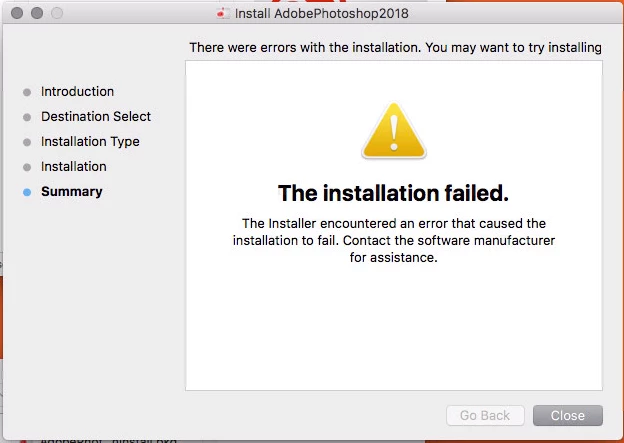
Here the last few entries of the installation log. WHAT AM I MISSING?????
Jul 19 07:57:40 new-kps-image-2018 Installer[2727]: ================================================================================
Jul 19 07:57:40 new-kps-image-2018 Installer[2727]: User picked Standard Install
Jul 19 07:57:40 new-kps-image-2018 Installer[2727]: Choices selected for installation:
Jul 19 07:57:40 new-kps-image-2018 Installer[2727]: Install: "AdobePhotoshop2018"
Jul 19 07:57:40 new-kps-image-2018 Installer[2727]: AdobePhotoshop2018_Install.pkg : com.adobe.Enterprise.install.A733B6A9-C149-433C-8734-EC3AC94B6ECF : 1.0.0.1.0
Jul 19 07:57:40 new-kps-image-2018 Installer[2727]: ================================================================================
Jul 19 07:57:40 new-kps-image-2018 Installer[2727]: It took 0.00 seconds to summarize the package selections.
Jul 19 07:57:40 new-kps-image-2018 Installer[2727]: -[IFPKGDerivedDocument sortedPackageLocations]: result = (
"file://localhost"
)
Jul 19 07:57:40 new-kps-image-2018 Installer[2727]: -[IFDInstallController(Private) _buildInstallPlanReturningError:]: location = file://localhost
Jul 19 07:57:40 new-kps-image-2018 Installer[2727]: -[IFDInstallController(Private) _buildInstallPlanReturningError:]: file://localhost/Users/tech/Desktop/Adobe%202018%20Installs/AdobePhotoshop2018/Build/AdobePhotoshop2018_Install.pkg
Jul 19 07:57:40 new-kps-image-2018 Installer[2727]: Set authorization level to root for session
Jul 19 07:57:40 new-kps-image-2018 Installer[2727]: Will use PK session
Jul 19 07:57:40 new-kps-image-2018 Installer[2727]: Using authorization level of root for IFPKInstallElement
Jul 19 07:57:40 new-kps-image-2018 Installer[2727]: Starting installation:
Jul 19 07:57:40 new-kps-image-2018 Installer[2727]: Configuring volume "Macintosh HD"
Jul 19 07:57:40 new-kps-image-2018 Installer[2727]: Preparing disk for local booted install.
Jul 19 07:57:40 new-kps-image-2018 Installer[2727]: Free space on "Macintosh HD": 184.2 GB (184196096000 bytes).
Jul 19 07:57:40 new-kps-image-2018 Installer[2727]: Create temporary directory "/var/folders/5h/0w10j53n2lv753v0z05nz4g00000gn/T//Install.2727L5FPC0"
Jul 19 07:57:40 new-kps-image-2018 Installer[2727]: IFPKInstallElement (1 packages)
Jul 19 07:57:40 new-kps-image-2018 installd[418]: PackageKit: Adding client PKInstallDaemonClient pid=2727, uid=501 (/System/Library/CoreServices/Installer.app/Contents/MacOS/Installer)
Jul 19 07:57:40 new-kps-image-2018 Installer[2727]: PackageKit: Enqueuing install with framework-specified quality of service (utility)
Jul 19 07:57:40 new-kps-image-2018 installd[418]: PackageKit: ----- Begin install -----
Jul 19 07:57:40 new-kps-image-2018 installd[418]: PackageKit: request=PKInstallRequest <1 packages, destination=/>
Jul 19 07:57:40 new-kps-image-2018 installd[418]: PackageKit: packages=(
"PKJaguarPackage <file://localhost/Users/tech/Desktop/Adobe%202018%20Installs/AdobePhotoshop2018/Build/AdobePhotoshop2018_Install.pkg>"
)
Jul 19 07:57:40 new-kps-image-2018 installd[418]: PackageKit: Session UUID file exists - will not overwrite /var/folders/zz/zyxvpxvq6csfxvn_n0000000000000/C/PKInstallSandboxManager/2A4C5479-F9BE-4773-AE4E-E53E20D4C232.activeSandbox
Jul 19 07:57:40 new-kps-image-2018 installd[418]: PackageKit: Extracting file://localhost/Users/tech/Desktop/Adobe%202018%20Installs/AdobePhotoshop2018/Build/AdobePhotoshop2018_Install.pkg (destination=/var/folders/zz/zyxvpxvq6csfxvn_n0000000000000/C/PKInstallSandboxManager/2A4C5479-F9BE-4773-AE4E-E53E20D4C232.activeSandbox/Root, uid=0)
Jul 19 07:57:40 new-kps-image-2018 installd[418]: PackageKit: prevent user idle system sleep
Jul 19 07:57:40 new-kps-image-2018 installd[418]: PackageKit: suspending backupd
Jul 19 07:57:40 new-kps-image-2018 installd[418]: PackageKit: Executing script "./preinstall" in /Users/tech/Desktop/Adobe 2018 Installs/AdobePhotoshop2018/Build/AdobePhotoshop2018_Install.pkg/Contents/Resources
Jul 19 07:57:40 new-kps-image-2018 installd[418]: ./preinstall: CCP Package Installer : preinstall launched...
Jul 19 07:57:40 new-kps-image-2018 installd[418]: ./preinstall: The language set is
Jul 19 07:57:40 new-kps-image-2018 install_monitor[2745]: Temporarily excluding: /Applications, /Library, /System, /bin, /private, /sbin, /usr
Jul 19 07:57:40 new-kps-image-2018 installd[418]: ./preinstall: CCP Package Installer : Working directory is /Users/tech/Desktop/Adobe 2018 Installs/AdobePhotoshop2018/Build/AdobePhotoshop2018_Install.pkg/Contents/Resources
Jul 19 07:57:40 new-kps-image-2018 installd[418]: ./preinstall: 2018-07-19 07:57:40.310 defaults[2761:102698]
Jul 19 07:57:40 new-kps-image-2018 installd[418]: ./preinstall: The domain/default pair of (/Users/tech/Desktop/Adobe 2018 Installs/AdobePhotoshop2018/Build/AdobePhotoshop2018_Install.pkg/Contents/Resources/../Info, InstallLanguage) does not exist
Jul 19 07:57:40 new-kps-image-2018 installd[418]: ./preinstall: CCP Package Installer : InstallLanguage specified in Info.plist in preinstall...()
Jul 19 07:57:40 new-kps-image-2018 installd[418]: ./preinstall: CCP Package Installer : Launching AdobeDeploymentManager...
Jul 19 07:57:51 new-kps-image-2018 installd[418]: ./preinstall: CCP Package Installer : Exit code of AdobeDeploymentManager is (84)
Jul 19 07:57:51 new-kps-image-2018 installd[418]: ./preinstall: CCP Package Installer : Exit ...
Jul 19 07:57:51 new-kps-image-2018 install_monitor[2745]: Re-included: /Applications, /Library, /System, /bin, /private, /sbin, /usr
Jul 19 07:57:52 new-kps-image-2018 installd[418]: PackageKit: releasing backupd
Jul 19 07:57:52 new-kps-image-2018 installd[418]: PackageKit: allow user idle system sleep
Jul 19 07:57:52 new-kps-image-2018 installd[418]: PackageKit: Install Failed: Error Domain=PKInstallErrorDomain Code=112 "An error occurred while running scripts from the package “AdobePhotoshop2018_Install.pkg”." UserInfo={NSFilePath=./preinstall, NSURL=file://localhost/Users/tech/Desktop/Adobe%202018%20Installs/AdobePhotoshop2018/Build/AdobePhotoshop2018_Install.pkg, PKInstallPackageIdentifier=com.adobe.Enterprise.install.A733B6A9-C149-433C-8734-EC3AC94B6ECF, NSLocalizedDescription=An error occurred while running scripts from the package “AdobePhotoshop2018_Install.pkg”.} {
NSFilePath = "./preinstall";
NSLocalizedDescription = "An error occurred while running scripts from the package \U201cAdobePhotoshop2018_Install.pkg\U201d.";
NSURL = "file://localhost/Users/tech/Desktop/Adobe%202018%20Installs/AdobePhotoshop2018/Build/AdobePhotoshop2018_Install.pkg";
PKInstallPackageIdentifier = "com.adobe.Enterprise.install.A733B6A9-C149-433C-8734-EC3AC94B6ECF";
}
Jul 19 07:57:52 new-kps-image-2018 installd[418]: PackageKit: Running idle tasks
Jul 19 07:57:52 new-kps-image-2018 installd[418]: PackageKit: Done with sandbox removals
Jul 19 07:57:52 new-kps-image-2018 Installer[2727]: install:didFailWithError:Error Domain=PKInstallErrorDomain Code=112 "An error occurred while running scripts from the package “AdobePhotoshop2018_Install.pkg”." UserInfo={NSFilePath=./preinstall, NSURL=file://localhost/Users/tech/Desktop/Adobe%202018%20Installs/AdobePhotoshop2018/Build/AdobePhotoshop2018_Install.pkg, PKInstallPackageIdentifier=com.adobe.Enterprise.install.A733B6A9-C149-433C-8734-EC3AC94B6ECF, NSLocalizedDescription=An error occurred while running scripts from the package “AdobePhotoshop2018_Install.pkg”.}
Jul 19 07:57:52 new-kps-image-2018 installd[418]: PackageKit: Removing client PKInstallDaemonClient pid=2727, uid=501 (/System/Library/CoreServices/Installer.app/Contents/MacOS/Installer)
Jul 19 07:57:53 new-kps-image-2018 Installer[2727]: Install failed: The Installer encountered an error that caused the installation to fail. Contact the software manufacturer for assistance.
Jul 19 07:57:53 new-kps-image-2018 Installer[2727]: IFDInstallController 65B0 state = 8
Jul 19 07:57:53 new-kps-image-2018 Installer[2727]: Displaying 'Install Failed' UI.
Jul 19 07:57:53 new-kps-image-2018 Installer[2727]: 'Install Failed' UI displayed message:'The Installer encountered an error that caused the installation to fail. Contact the software manufacturer for assistance.'.
 AdChoices