
Installation issues with Adobe Acrobat DC Patch 22.003.20258
I came across an issue installing the latest Adobe Acrobat DC patch 22.003.20258. It appears that the attempt to rebrand the shortcuts from Adobe Acrobat DC to Adobe Acrobat causes the application to fail if certain customizations were made to the Acrobat DC installation. In my case, the problem was that when Adobe Acrobat DC was customized (using the Customization Wizard) the Distiller shortcut was removed. When the patch is being applied, the following error was displayed:
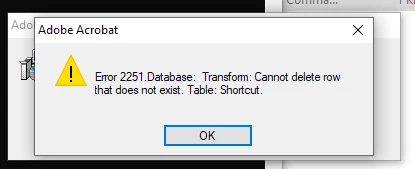
I resolved this error by recreating the MST and including the Distiller shortcut. Then I replaced the cached MST located in the C:\Windows\Installer\{AC76BA86-1033-FFFF-7760-0C0F074E4100}. The patch installed without issue.
Reviewing the contents of the MSP, revealed that a property was available to control whether or not the desktop shortcut is to be installed, DISABLEAPPDESKTOPSHORTCUT="1". However, a similar property was not available to control the Distiller shortcut. As our best practice is to not change vendor provided installers directly, I am hoping that this will be addressed in the next patch.


 AdChoices