issues between SharePoint 2010 <==> Acrobat X Pro and autosave
Hey all,
Seeing two issues with Acrobat X Pro in an enterprise environment that also uses SharePoint 2010 heavily.
#1
Crashing Acrobat X Pro not autosaving correctly when dealing with partially remote user profiles. These are user profiles that are local (not roaming profiles), but are forced via registry to consider the Documents location to be a network location (accessible via CIFS). I noticed when helping a user that has lost work that the temporary autosave files are still local, and there did not seem to be a recovered document via Acrobat for this SharePoint-loaded PDF file. The user had this file checked out and had done a few hours of work when the crash happened. Any recommendation on:
- reporting this to an Acrobat engineer, particularly the team working with SharePoint integration via the dll Acrobat uses to accomplish that
- settings to tweak to ENSURE that crashes will leave recoverable autosaves when working in Acrobat directly on SharePoint 2010 PDF files
#2
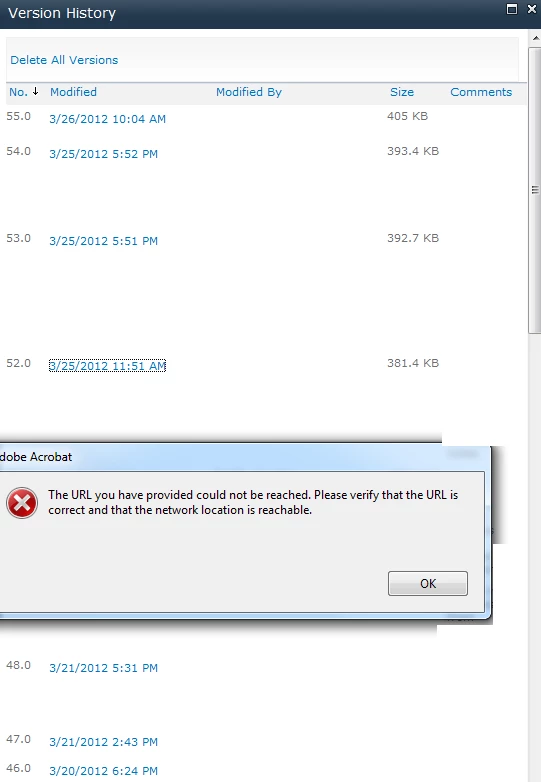
The following error is produced in Acrobat when trying to click version history documents in SharePoint 2010. "The URL you have provided could not be reached. Please verify that the URL is correct and that the network location is reachable." The revision of the document is reachable, but through typical HTTP via a web browser...but not through the SharePoint <==> Acrobat X Pro COM object magic that works fine for currently checked out documents. Please see inserted image. Thoughts on a fix?
 AdChoices