


Participant
March 6, 2021
Answered

Lost files

  • March 6, 2021
  • 3 replies
  • 338 views

Hello, I need help!
I'm a graphic design student and my high school pays me the Adobe suite every year. This year, I happened to copy all of my files from the Creative Cloud to my USB flash drive. After that, I deleted the files from my Creative Cloud to make space (thinking that all my files were copied to my USB flash drive). But when I opened the USB flash drive, the tree structure of my files was there but not the content (all my InDesign, Illustrator, PDF files... disappeared!).
I can't contact Adobe support because this message appears every time: "You don't seem to have access to Adobe Admin Console. If you think this is an error, please contact your system administrator".
Does anyone have a solution?

This topic has been closed for replies.
Correct answer kglad

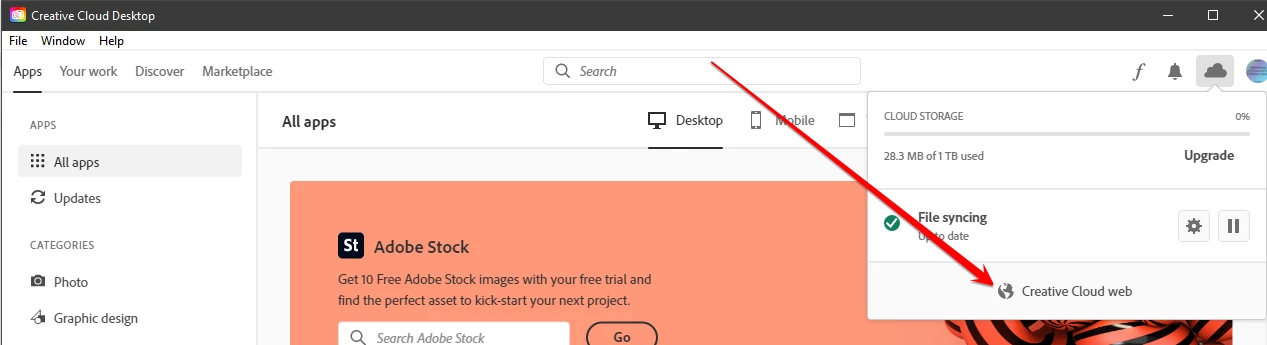
open your cc desktop app

click the cc web link


check your deleted files and restore them.

3 replies

Nancy OShea
Community Expert
Community Expert
March 7, 2021

You can never have too many pairs of shoes or file backups 🙂


Nancy O'Shea— Product User & Community Expert
Peru Bob
Community Expert
Community Expert
March 7, 2021

@Kyrä wrote:

 I deleted the files from my Creative Cloud to make space (thinking that all my files were copied to my USB flash drive).


I know it doesn't help right now, but please see Schofields second law:

https://www.zdnet.com/article/follow-schofields-three-laws-of-computing-and-avoid-disasters.


kglad
Community Expert
kgladCommunity ExpertCorrect answer
Community Expert
March 7, 2021

open your cc desktop app

click the cc web link


check your deleted files and restore them.